Wednesday, February 2, 2022

Turnout & Signal Control Firmware/PC SW (Part 3)

Overview

This post is mostly about the PC software/PIC Firmware API and issues that needed to be resolved with the 10 year old software.  But first a look from a high level what the main issue is.  The combination of PC software and PIC firmware form a bridge between what the user sees and what the hardware does.  The user sees a turnout or a signal a with a number associated with it.  The hardware sees a PIC GPIO port that needs to be manipulated.  Somehow these two perspectives need to be bridged in the PC Software and PIC firmware.

Since I have (or will have) a U shaped layout, turnouts,signals, uncouplers, LED lighting, etc on one side of the helix are even numbered and on the other they odd numbered. Where there are multiple track levels, the top level has 100 added to the number.  The hardware interface to the train layout is 40 connection points that will energize a solenoid for a specified period of time.  To reduce confusion, I will only describe how the turnout works. The remaining layout devices have similar functionality.

As a refresher, each normal turnout has two states.  These two states are controlled by solenoids that are momentarily energized.  Thus a turnout has two control wires, each energizing a solenoid that moves the points to either straight or turn.  For those EEs out there is similar to a dual coil latching relay.  You momentarily energize the the solenoid to position the points (or the signal) to the position that you want.  Thus a single track needs two connection points from the hardware.  

Electrical Color Coding

As a quick aside, in the old Marklin world, electrical connections were color coded by the pin connectors.  These were

  • RED - track power(voltage varies in analog and is constant is digital)
  • BROWN - common
  • YELLOW = accessory power (power for turnout/signal and lights)
  • GREEN - turnouts straight, signals go
  • RED - turnouts turn, signals stop  ( not much chance of confusing this with track power)
  • ORANGE - third solenoid for special accessories
  • GRAY - not used
  • BLUE -I added this for 3 way turnouts, though blue pin connectors were a 3rd party item

I have used these colors in the interface to ease the understanding and implementation of the interface.  Also there are 3 types of turnouts, left/right for straight/curve, a slip turnout and a 3 way turnout (that uses 3 wires to control it) and two types of signals. Regardless they have similar functionality. 

User Interface

The task for the software is take the user number assigned to each turnout, which in turn has two wires connected to the hardware, determine the appropriate PIC GPIO pin and then transmit this data over the MiWi network.  Here is the basic user interface

When the turnout is connected to the hardware, the port number is noted along with the action of that connection, straight (green) or turn (red).  The information in this grid is kept in the EEPROM on the PCB in this format and in an INI file on the PC.  The first two columns are populated by the software depending on the the hardware connected. The Device Type is chosen from a list that is derived from the Port Type column.  The Action and Time(ms) column is chosen from a list that is derived from what is selected in the Device Type column.  The User # is entered as number (1-255) by the user.

How It Works

When the MiWi network initializes, the ports information is sent through the MiWi network to the Master MiWi device which is connected to the PC via a USB HID connection.  Once all of the port connection data is received by the PC software, the data is sorted into another temporary table that is organized and sorted by the layout device (User #).  This table describes which connection ports are connected to each layout device and what action each one of these connection ports does.  Note that there is no requirement to use successive connection ports, it just make it easier to keep track of the layout devices.  PC software and PIC firmware do not care if the green lead is connected to #1 and the red lead is connected #23 connection ports. 

With this temporary table I call the Device Data Table, the GUI can determine which port number will need to be energized to set the turnout points in the correct state.  If I chose to set turnout #35 to turn, the software scans the Device Data Table looking for turnout #35.  Once it finds the table row with turnout #35, it scans the row looking for which port has been assigned to the turn (RED) action.  Now it sends a MiWi message containing the board number, port number and the on time.  The other data in the table is not relevant to energizing the solenoid.  AS described above, it was used in the setup phase to help the user make the correct choices as to options for each layout device.

The PIC firmware then needs to translate this port number into a GPIO pin.  To make this easier, the 40 connection ports are sequentially arranged in 3 MCP23S18 16-bit IO expanders.  The last 8 pins are used for the track control.  It is a simple matter of bit manipulation at this point.  With a zero based port number, the lower 3 bits determine which bit in the 8 bit port needs to be set.  The next 3 bits will choose which of the five 8 bit ports to use.  The firmware then sets the bit, energizing the solenoid.  After the directed time has expired, the firmware clears the bit and the solenoid is de-energized.


Tuesday, February 1, 2022

Turnout & Signal Control Firmware/PC SW (Part 2)


I am going to modify this series to include the PC software, since the PIC18F firmware and the PC software are intertwined.  In the last post on this subject, I discussed some of the startup issues of getting the firmware working with the Microchip XC8 compiler, since the C18 compiler is no longer available and issues with the PIC18F47J53 itself..  Having worked through those issues, the "bringup time" on the real PCB was reduced.  There were still several "coding issues" that had be resolved.  I had put in quite a few compiler #ifdef directives.  These blocked sections of code for the Explorer 18 Development board and the real PCB.  Obviously I could not test the real PCB sections until the PCB was available.  Mostly it was coding errors of PIC18F pins and registers.

It took a little more than a day to get the PIC18F47J53 working with the EEPROM, the MCP23S18 IO Expanders and the MRF24J40 module.  So how do I test this.  

Initial Testing

The first testing I do is timer testing.  I have debug routines written for all the basic timers. In this processor those are, Timer1, Timer3 and Timer5.  I have predefined periods of 1ms, 10ms and 25ms.  Then I toggle a GPIO pin based on this and measure the output on a scope (Analog Discovery 2 in this case).  This serves multiple purposes.  First it verifies that all of the clock calculations that are defined are correct and that the timer periods are correct.  

    /*******************************************************************/
    /********************** CLOCK DEFINITIONS **************************/
    /* this is where the clock is set for calculations elsewhere       */
    /*******************************************************************/
    #define CLOCK_FREQ 48000000
    /*********************************************************************
    * Overview: These macro returns clock frequency used in Hertz.
    ********************************************************************/
    #define GetSystemClock()                    CLOCK_FREQ
    #define SYS_CLK_FrequencySystemGet()        CLOCK_FREQ
    #define SYS_CLK_FrequencyPeripheralGet()    (SYS_CLK_FrequencySystemGet()/4)
    #define SYS_CLK_FrequencyInstructionGet()   (SYS_CLK_FrequencySystemGet()/4)
    #define FCY                                 (SYS_CLK_FrequencyInstructionGet())
    #define Fosc                                SYS_CLK_FrequencySystemGet()

Next I will toggle all the GPIO pins to make sure there are no PCB manufacturing errors and no soldering errors.  Once this is done, I can move on to functionality testing.  As you can see from the code segment below, I use #ifdef to block out the debug test routines that are located in the board initialization function.  I have found this is much easier than commenting and uncommenting lines of code. The LED toggle is used a visual cue that something is happening and the code has not "crashed".

    /*******************************************************************/
    /********************** Debug Testing ONLY**************************/
    #define EarlyDebugTesting
    #ifdef EarlyDebugTesting
        while (1)
        {
            TimerOutputTesting();
            PICPortCycle();
            SPIBus_WRITE();
            SPIBus_READ();
            GetBrdSerialNumber();
            SaveBrdSerialNumber();
            mLED_G_Toggle();
        }
    #endif
    /*******************************************************************/

At this point in testing, the PC software communicating with the PIC18F firmware is how all remaining testing is done.  I have created several "Testing Functions" in the PIC18F firmeare that are callable from the PC software.  By changing what happens in these functions, allows me to exercise the entire PC software/PIC18F firmware USB HID interface and the device feature under test.

EEPROM Testing

First tests are can I write and read back the board serial number and EUI address.  Once this was good I moved on to a much more complex operation.  This involves storing the configuration data of the PCB.  More on the features of this below.  Once that worked and I could succesfully read back the configuration, the EEPROM testing was done.  The only other thing I could have done is do write-read of all location using 0x55,0xAA and waling bits.  Something you wold do in product manufacturing environment.  But at this point, if the tests I was doing worked, this full access test would have worked also.  

IO Expander (MCP23S18) Testing

Since the EEPROM was working, the SPI bus is working.  That allows me to move on to more complex testing without having to worry about underlying issues.  I chose to write to the GPIO output registers on each of the three devices.  I write the two different bytes to each of the three devices (16 bit devices), then read them back.  Then I did some simple checking that the output pins are moving.  This was a little difficult since these are open drain outputs.  But I turned on the weak pullups on the outputs to accomplish this testing.

Track Control Testing

As I explained in Part 3, there was some concern about not having pullups on these relay controls. But the MCP23S18 pullups worked just fine.  Since the spring clamp connector was not installed yet, I used a DVOM to measure resistance between the track power feed and the track siding power connection.  As I changed the siding power state in the PC software, the DVOM either shows a short or an open.

LED Control Testing

This was similar to the track control testing, except this is controlled by PIC18F GPIO pins that turn ON/OFF an N-Channel FET.  As in the IO Expander testing, when the FET is off, the output is open drain.  Since the spring clamp connector was already installed, I successively placed a 330 ohm resistor between the 5VDC point and the seven LED pins.  Then the LED control pin either measure 5VDC or ground.

Relay Control Testing

This will be done in two parts.  Once all the circuitry is installed, I will get a turnout and connect it to the PCB and then ground to the train transformer.  Since the spring clamp connectors are not installed, I can use an appropriate size wire in the component holes to control the turnout on each of the 40 positions.  Once this is done, I install the spring clamp connectors and run the test again.  The first test is looking for cold solder joints, firmware issues and PCB manufacturing issues.  The second test is looking only for soldering issues.  The connectors are relatively expensive and hard to remove, so the first test hopefully eliminates any failures that would make the PCB unusable.

MiWi Testing

In the previous incarnation of the turnout and signal control board, I had spent a lot of time getting the MiWi to work.  Also I had done a few consulting projects that used this MiWi Mesh Protocol.  In the Explorer 18 Development board version, I used the latest non-library version that would compile under an XC8 compiler, did not want to deal with libraries.  When I turned the development board on and the current train layout, the development board connected to that MiWi network and all was good.  As described in this Blog Post, I use a Zena Device for the master station.  The PC software connects to it over a USB HID interface and then sends/receives messages to/from the multiple turnout & signal control PCBs mounted under the layout.  Most of the testing above is done using this PC interface and sending/receiving MiWi messages across the network.  While this may not be a comprehensive test, bit error rate, messages dropped, etc, it is good enough for what I am trying to do.

In the next part I will describe the PC software in more detail and some of the issues that had to be resolved as well as others that may not be solved yet.


Monday, January 31, 2022

Train Turnout & Signal Control Design (Part 4)


I have discussed the PCB development in these previous posts, Part 1 , Part 2, and Part3. Here you can see the PCB with most of the components installed.  Only components missing now are the spring clamp connectors and the FETs circuit that drives the 40 relay contacts.

When I built the original PCBs, I only really tested the relay interface.  The track and LED control were only partially implemented in the PIC18F firmware.  Now I am getting more done and have actually tested the track and LED control interfaces and they work as expected.  Since all the relays were installed along with the LED control circuits, I have had the opportunity to test these as well.  Found one cold solder joint, but other than that, all was good.

One item I have not brought up is the small daughter card plugged in perpendicular on the left hand side.  This is a substitute for the MRF24J40MA module from Microchip. This is a Digilent Pmod device (similar to Mikroe Click Boards).  I added a connector for this Pmod board when it became quite obvious buying Microchip MRF24J40MA modules at a reasonable price was going to be impossible.  This PmodRF2 is an excellent temporary substitute for the Microchip module.  I was able to purchase them at Digikey, Mouser and Amazon, so I picked up 6 of them just to have them.  I prefer the Microchip Module since it is soldered down. When the PCB is installed underneath the train layout, this daughter card will be perpendicular to the bottom of the layout.  Underneath the layout will become storage and I am afraid that these cards will get bumped into and either destroy them or the entire PCB.  But for now they are better than nothing.


Sunday, January 30, 2022

Train Turnout & Signal Control Design (Part 3)


I have discussed the PCB development in these previous posts, Part 1 and Part 2. Here you can see the PCB with the power section installed and the PCB running from a train transformer.


The parts that I received from WinSource work just fine.  They were about 2X the Digikey price and $50 DHL charge, put I have parts.  This design uses the LMR14030, which has a 40V input maximum and a 3A output @5VDC.  The 5VDC has three uses

  • Power the digital section through the MCP1825ST 3.3VDC LDO
    • PIC18F47J53, MRF24J40MA, MCP23S18, 24LC160
    • The above use just under 75mA
  • Provide miscellaneous power,
    •  the bias control for the switch/signal relays and power the track control relays
    • This section uses < 10mA, on average
  • LED power for the 7 LED channels
    • This is where most of the 5VDC will be consumed.
    • Probably about 60mA per channel or <500mA

This leads to a total power consumption number of less than 600mA.   So the LMR14030 is a little over kill.  The other two designs, the MiWi to BT Bridge and the Train LED Controller, both use the LMR140100.  This DC-DC converter is from the same family as the LMR14030, but has a maximum current output of 1A, a small reduction in PCB real estate and smaller simpler package to install (no power pad).  If an LMR14010 had been used, the total LED power would have been limited to about 850-900mA.  At a max of 20mA per LED attached, this would provide power for about 40 to 50 LEDs.  With 4 to 5 of these installed and the Train LED Controller, that would have been sufficient. 

Not sure how noisy this DC-DC is, but the USB connected without issues.  I then reinstalled the MiWi code and the entire system connected to the MiWi network.  There are some obvious protocol issues that need to be resolved.  I need to get my TEK scope out to look at the noise factor.  The Analog Discovery 2 is nice, but it has limits when looking at power supply noise.

The MCP23S18 IO expanders have open drain outputs.  I turned this into an advantage with the switch/signal relay control.  Instead of 3.3VDC to turn on the controlling FETs, I designed a way for 5VDC to be used to turn the FETs on, driving them further into saturation and providing a little more current to drive the relays.  There are 3 of these MCP23S18 16 bit IO expanders.  Of the 48 ports, 40 are used for switch/signal relay control.  The remaining 8 are used to control 4 track/catenary control relays (Track ON/Track OFF).  These are used to control the track/catenary power to dead end track sidings.  This provides the ability to park engines and not worry about power being applied to them, especially in the non-digital mode of train operation.  

In my haste to get this board done before Chinese New Year holiday, I missed that the control lines to the FETs controlling these track/catenary relays did not have pullup resistors. Oops😒.  Well the MCP23S18 does have weak builtin pullups that are firmware controlled.  I was worried that they might be to weak to turn the FETs on.  Fortunately the FETs require very little current to turn on and the track/catenay control relays work just fine.

Next is to work on the protocol issues and install the 40 FETs/diodes/resistors that control the switch/signal relays. 


Friday, January 28, 2022

Train Turnout & Signal Control Design (Part 2)


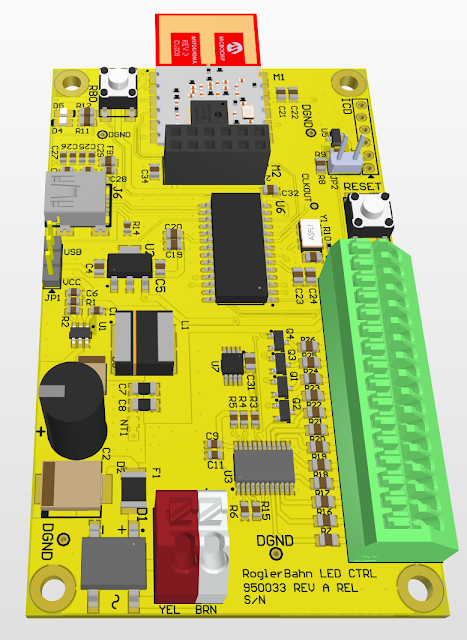
I received the PCB the other day.  I had discussed the design ideas for this PCB in Part 1.The request was for yellow solder mask with black silkscreen.  As you can see from the picture above, it is more orange than yellow.  I think there was too much RED left in the solder mask machine when they applied the yellow.  Oh well it is different and the price for a 4 layer was still very good.  Hopefully there wont be any other problems with the PCB.

Here is the digital part working.

All of the digital uses 3.3VDC.  The power section takes 16VAC (train layout voltage) and generates 20VDC+ (straight out of the full wave bridge with some capacitance) for activating the turnout/signal relays and then generates 5VDC (for LEDs and relay bias control) with a small DC-DC converter.  The 3.3VDC is generated from a small LDO.  Look close to the right of the push button and below the jumper and you can see a space wired SOT23 device.  The LDO was supposed to be a SOT223-3 device.  My first choice was a MCP1825ST, but was out in time to next Xmas, so I found what I thought was a pin compatible LDO, it wasn't.   Now I have found one (triple check), but I thought I would wait a few more days to see if anything else needs replacing. 

The jumper selects either the Power Section 5VDC or VUSB.  That way I can power the digital section without the train transformer and still do debugging and programming.  The Analog Discovery 2 from Diligent is helpful when looking at changing outputs.  With the 34" monitor, I can run a remote desktop window for my other laptop which is running the Digilent Waveforms and the PC program that interfaces to the PCB.  The main laptop has the MPLABX and ICD connection. 

Next up is the power section.  The DC-DC converters came in today, we will see if the Asia reseller market has real parts.


Thursday, January 20, 2022

Train LED Controller


I completed my last design for a while.  This is the LED controller for the lights in the buildings, freight yards, etc.   It has 12 LED channels, 8 of them are controlled by an I2C based LED controller and 4 by the PIC.  The 4 PIC channels are connected to PWM channels and the LED controller has individual PWM controllers for each of the 8 channels.  This will allow for some different lighting effects besides just off and on.

This uses the PIC18F27J53 processor and a MRF24J40MA MiWi transceiver.  As I have done with the switch/signal board, I also included a connector for the PMOD version of this.  I have several of those and will have to use them until the MiWi Module becomes available from other than the resellers.

This was done on Sunday, but during the final purchase review I discovered that the LED controller I picked did not do everything I wanted.  I had discovered a LED controller (LP5569) from TI when working on the new Brick Controller design.  It was a 9 channel (triple RGB) sink style controller, but with a current limit of 25mA that was software controlled.  That was OK for a Lego display and might have worked for the train.  But that IC disappeared, with next availability sometime in 2023.  I found a firmware compatible earlier version (LP55231) at a Chinese reseller so I bought the MOQ qty of 20, but at 5x the price.  This new LED controller is a source style, 25mA limit.  After much thought on how this PCB would be used in layout lighting, I decided that 25mA was too much of a restriction and in the end did not like the source style.  I had considered placing a N channel FET in each channel to increase the current limit, but that just seemed like adding a lot of complexity.

So after a day of searching for alternatives that can be purchased, I found one from NXP.  This is an 8 channel sink style controller, each channel can sink 100mA.  The TI controller was in nice compact 24 pin QFN with a big power pad on the bottom.  The NXP is in a 24 TSSOP package, though it has 4 ground pins.  We will see how it handles lots of current.  This NXP does come in a QFN, but it is being discontinued.  I had to give up the RGB feature of the LP5569/LP55231, but I have not found an application for that feature yet.

This design has a DC-DC converter that converts the 16VAC to 5VDC @ 1A+.  The processor and the radio use about 50mA, so the rest is dedicated to lighting power.  It also has 8K or bigger I2C EEPROM for storing the lighting configuration, so on power up a standard lighting arrangement will be executed.  I wanted to use a SPI EEPROM, since the other two boards use those.  But the PIC18F27J53 has 2 MSSP devices, but has only one I2C port and it is fixed (electrical requirements of I2C dont allow for reassignment) and uses the same pins as the fixed SPI port.  So when you use an I2C port on this part, you loose a SPI port.  Since the radio module wants to be on its own SPI port and the LED controller needs an I2C port, the EEPROM became I2C.  Which created its own availability nightmare.  Mostly finding an IC package and industry standard firmware access I might be able to buy in the future.


Wednesday, January 19, 2022

A MiWi to Bluetooth Bridge


To control the train system I used the Zena Wireless Adapter, pictured below from Microchip.  The Zena has a PIC18F27J53 and the MRF24J40 MiWi transceiver.  I actually opened it up and reprogrammed it so it would handle by higher level protocols.  One big downside is even with a USB Bootloader, you still have to open it up.  Also I am constantly misplacing it, since it is just a USB dongle.

AC182015-1 Microchip Technology | Mouser

I also would like to use the Tablet/Phone to control the trains.  This means either a MiWi-Wifi bridge or a MiWi-Bluetooth bridge.  I bought the Microchip developers kit for the Wifi bridge, but I have never figured out to do these micro web servers, etc.  With Bluetooth I have extensive libraries, since I use it for quite a few of my little modules.  So the picture at the top of this post is the answer.  This PCB will be mounted on the edge of the train layout so that I can connect a USB cable when needed.

What is it?

The design is quite simple,  A 2" x 4" 2 layer board that is everything the Zena is plus a BT module and some LED power.  Since you cant buy MRF24J40MA modules until late 2022/early 2023, I decide to go a slightly different route.  I can buy the Mikro Bus CLICK versions (https://www.mikroe.com/mikrobus).  On some level just plugging in a module is appealing,  I did violated the Mikro Bus spec by only connecting the lines I need and in my configuration.  But the configuration seems to be the same for all the MiWi and BT Click modules.  Thus you will be able to use this PCB to build a bridge between any MiWi module (2.4GHz, 900Mhz and 315Mhz) and any BT device that a CLICK module exists for. 

This design has a DC-DC converter that converts the 16VAC to 5VDC @ 1A+, but is good up to 24VAC input.  The processor and the radios use about 50mA, so the rest is dedicated to lighting power.  I added a SPI EEPROM for storing configuration information. Finally there is a 5VDC switch that will be used for 5VDC LED lighting, using the left Red/White connector.  There is about 800mA+ of excess power.

This one is supposed to be white with black silkscreen, the color rendered did not quite do white, it was 255, 255, 255 though.