Sunday, November 19, 2023

Curved Cliff - Part 6


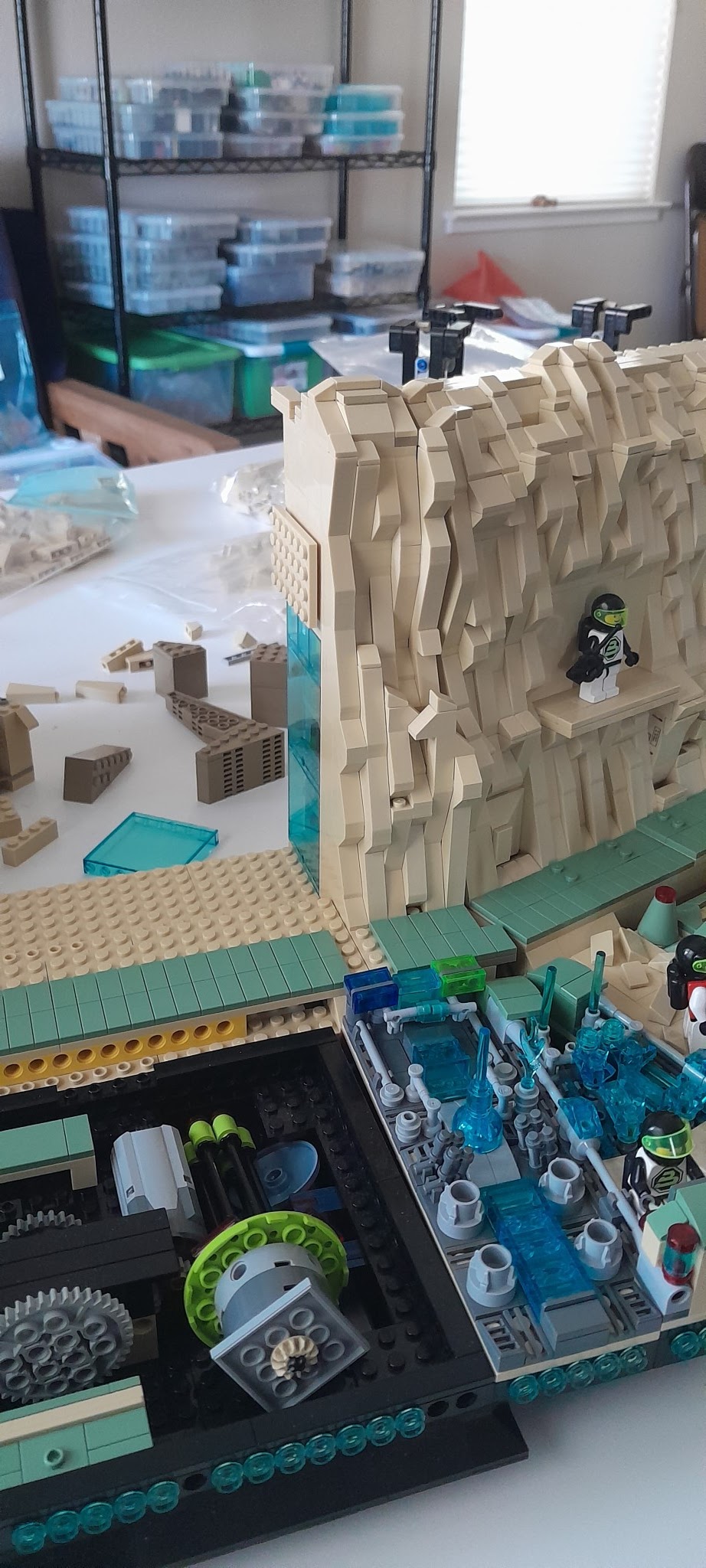
 Moving on to the rock work.  

The long view.

A closer view.  The right side angle portion has been integrated into the straight section.  The left side is still separate.  This is because adding the left side will not allow the cliff to fit into the standard shipping box.

I added some striations of color into this one.  A combination of dark tan and medium nougat. 

This is the finished version of the right and center section.

This shows the left side support structure completed.

Finally a sweep from left to right of the finished rock face.


You can see the line where the right and left side mate to the next cliff module.  Unlike when to straight modular sections meet and the line can be hidden, this is not the case here.  I did do some 90 degree turns of the slope pieces.  Also because of the way the structure behind the rock face is done, this cliff face does not slope as much.  The difference is slight, but I can see it.


Saturday, November 18, 2023

Curved Cliff - Part 5


 Progress is a relative term.  Testing positive for COVID on Monday has slowed things down somewhat.  While this is a very mild case, working has been challenging.  Because the second level ended up on the wrong level, it was one brick height too high, and because I wanted to integrate the right side angle piece into the main section, I started over.  This picture shows what was stripped back.

This shows the backside and where the second level will end up.

First task is to make sure the wiring is in place.  I am using the 1 x 2 brick with a vertical groove in it.  Also when the electrical is just power, (on/off vs actual lighting features) I am using the ribbon cable version of the 30 gauge silicone wire.  You can get this wire here.

I used a 1 x 2 Technic brick to pass the wire up from the bottom.  The vertical groove is large enough for the wire to pass through with only one side.  That is you do not need to create a larger hole by placing two bricks back to back.  The problem with this is approach is that this creates a 1 x2 brick stack that is only secured at the bottom and the top.


As these two pictures show, a few times I did use two bricks back to back, but they are rotated 90 degrees to lock the stack into the wall. Takes more 1 x 2 brick with vertical groove, but provides more stability. 

At the top is another 1 x 2 Technic brick to pass a wire to the front side.  This wire will be used to light up the second floor.  The wire will have to be concealed behind the rock work.

At the top of the first floor the wire needs to run along the ceiling.  Using 1 x 1 round plates, I can thread the wire through the gaps in the 1 x 1 round plate stack.

This picture shows a closeup of how the wire is routed through the 1 x 1 round plate stack.  

Now on the other side as the wire runs up the rock face side to the second floor ceiling.  This starts as a 1 x 2 space for the 1 x 2 brick with vertical groove.  Then it is reduced to a 1 x 1 space and I use a 1 x 1 round brick.  The wire runs in the space left by the 1 x 1 round brick.  At the top it goes through the wall at the top through a 1 x 2 Technic brick.

This methodology continues up the rock face until we get near the top.  This picture shows the rock work just as we reach within one brick height.  The wire is running through the space created by the round brick.  I had to put one 1 x 1 round plate to level the right side off.  Then a 1 x 2 inverted slope is needed to level the left side.  Also the inverted slope is needed to create the space for the final 1 x 2 brick with vertical groove. 

This picture show the 1 x 2 brick with vertical groove in place and the wire passing through the 1 x 2 Technic brick to the other side of the wall for lighting the second floor.

More on the rock face next time.


Friday, November 10, 2023

Curved Cliff - Part 4


More progress, but this time it is not actually on the cliff wall or the plateaus.  This work was all in the front and concerned the platform connectors.  This picture shows the platform connectors I was using for the development work.  The two straight connectors are the ones I have used in the display for a while.  They are shown below.

The same goes for the small angle platform connector shown below.

The angle connector on the left side was a modified version of the large angle platform connector. I needed it to be 22.5 degrees so the standard 45 degree cut wedge plate pieces would work.  After looking at these and how they were performing, I decided that it was time to build a custom platform connector (actually two) for this curved portion.  The total distance covered was too great for just Technic pins to support the connections.  Buy building customs platform connectors, I can reinforce the platform connector so there is no sag.  And, I was going to have to replace these for the display if I used them, so I was going to have to build something.  Might as well as be these new custom platform connectors.

Here is where I ended up.  Right now they are just functional, no detail has been added.


Here are closeups of the custom platform connectors.  The largest area in the turn was added to the platform in front of the curved cliff section.  


Here you can see what was replaced.

Detailing these platform connectors is the next step.  These are much bigger than a standard platform connector.  On the left I am thinking about another ramp similar to the one I did for the floating platform.  Plus a staircase up to the walkway that goes around the display.  This could be some kind of loading dock.  The other one will be some variation of what it replaced, vents and a control panel.  A maintenance station would be the best description.  


Thursday, November 9, 2023

Brickpalooza


                A LEGO® Fan Festival, Exhibition, and Celebration

December 9, 2023

Placer Valley Event Center

Click here for more Information


This is the our next event.  Hope to see you there.


Wednesday, November 8, 2023

Curved Cliff - Part 3

More progress.  The actual cliff wall is not progressing, though.  Mainly due to a lack of parts.  Bricklink's closing temporarily has put me behind schedule.  While I had placed my orders on 11/3, it was right before the shutdown.  Two of the three orders were downloaded by the stores, but one did not get there before the shutdown and that one had most of the cliff pieces.  They are waiting for Bricklink to come back up so they can access the order.  So now I am working on the back side of this cliff wall section.

Here is the top of the plateau. The section on the left is the hanger section for the last straight section.  Then comes the first turn (corner section) and then finally the space port.  The space port plateau will have a corner cut off as this shows.  

From this view you can see how the corner section plateau lines up with the last section plateau.  The only possible connection will be to use a hinge plate to tie the two plateaus together.  This mechanical connection will have to be disguised by the terraforming of the plateau that is yet to come.  The same is true for the mechanical connection between the corner section plateau and the Space Port plateau.

You will notice that some of the wedge plates are Dark Tan.  Well not every wedge plate comes in Tan, so there are going to be compromises.  But I have used Dark Tan in the cliff wall to change it up some.  And I will used some Dark Tan in the plateau terraforming.  So it is not really out of place.

Here is a view under the plateau.  Some gym equipment has been moved in.  It is obvious that the second level on the curved section cliff and the Space Port cliff is too high.  The equipment just barely fits.  These two second levels need to come down at least one full brick height if not a little more.  Just need to make sure that is not too low, such that it starts to cramp the first floor.  

Squeeze here and it pops out of there.😎


Monday, November 6, 2023

Curved Cliff - Part 2


Progress is being made.  The right side section that interfaces the turn is done for now.  Here are some different views.


The interface is obvious, unfortunately.  But it is ot horrible.  If this were a permanent type display, something more might be done.  But since I need to move the display and this is where the break is planned, we will have to live with it for now.  In time there might be a better way to do this, but rectangular bricks and not a 90 degree turn just don't mix.

Here are two more pictures that show the progress in building.


The right side (front view) is the acute angle bridge.  I needed something to go into that space that was small since it is only a few studs wide.

 
I came up with this.  Not sure what it is yet.  It is obviously storage of some kind.  These containers are found all over the Space Outpost, so they must be important.

Finally the bottom level of this section will be the cafeteria and open up to the dining hall.  The second level will be the gym.   More on these two later.


Friday, November 3, 2023

Brick Buddy ONE Upgrade


For some unknown reason, I started upgrading the firmware on the Brick Buddy ONE. Since I had done all of this software work on consolidation and refactoring, I thought lets do it.  Plus I need a 4 motor controller and Brick Buddy TWO is still a long way from being ready.  Thus during the road trip, I started working on upgrading and refactoring.

Brick Buddy ONE was done over five years ago and was written using the C18 compiler.  First task was to transition to the XC8 compiler.  Most of this went fairly smooth as I don't try to rewrite the whole thing and then start compiling.  I stripped it down to just the startup code and worked on it until it compiled without error.  This is the main loop

    while(1)
    {
        ProcessIO();
        PWMCtrl_Tasks();
        SCRIPT_Tasks();
        BT_Tasks();
        USB_AppTasks();
        APP_Tasks();
        BlinkStatus();
    }//end while

So what I do is comment all of these out and then start adding them in one at a time.  Solve the compile issues and move on to the next.  By the end of the road trip, I had left to do Script and Bluetooth.

Before proceeding on adding the remainder in, I connected to the USB port and started testing out the USB interface to the PC program.   Once the LEDs and Motors worked, it was time to get back including the remainder of the code.

One interesting thing that happened was that uint16_t type could not be found.  I got around it by using uint32_t since I was only compiling and not actually running at the time.  Eventually to solve this error I had to delete the project and start over again.  There must have been something in the project file from C18 that was getting in the way.  Once I built the new project, uint16_t no longer caused issues.

Next issue was FLASH size.  The PIC18F45K50 only has 32K of program FLASH, compared to the 64K of better in all the other controllers.  Changing the controller is not an option for the simple reason that the 18F45K50 is the only crystal less USB PIC.  There are multiple larger USB PICs, but all require a crystal for USB 2.0.  At optimization level 0, I exceeded the memory towards the end of the BT implementation and before the Script implementation.  At optimization level 1, I have about 7K left after BT implementation,  Hopefully that will be enough, else I will have to buy a monthly XC8 license to compile this.  Also means that the bootloader may not fit any more, but we shall see.  I also need to make a pass through the code and see if there is any compaction I can do.

Right now I have basic USB interface working and some of the BTLE interface working.  Maybe another week to finish this.

What do I get out of this.  Well a common User Interface for both the PC and Android.  Right now, the Android Interface only works on the new designs and I have limited control over all of the Brick Buddy ONEs I am using.