Thursday, August 3, 2023

Light Buddy 2 Scripting


Scripting is now coming in two forms.  

  1. Static LED that is time invariant
  2. Time based LED action


The time invariant scripting means that the user will setup the LED actions using this screen.  They will assign the LED effect, any features and the brightness (when available).  Using the LED option on the menu, they will store these settings in the Light Buddy 2.  When the unit powers up, it will load these settings and run forever.  This is equivalent to a one line script that is on repeat forever.

Time based is the normal scripting.  The user assigns the LED action at a given time, saves the step, increments the time base to the next event and continues.with the next LED event.

The issue with the Light Buddy 2 is the script storage.  There is no room for an external EEPROM.  The internal EEPROM storage is about 200 bytes once all the configurations data is set.  That leave about 40 script instructions.  But every LED effect takes an instruction.  If all six LEDs change at one time interval, then 6 bytes are used and that would allow for only 6 time intervals. 

There is about 4K bytes of program space left.  If I allocate 1K to script storage, that would allow for four times the storage.  Writing into program memory on a PIC is not difficult, but care must be taken as to not overwrite program storage.  This is my next task, so that I can increase the available script storage.


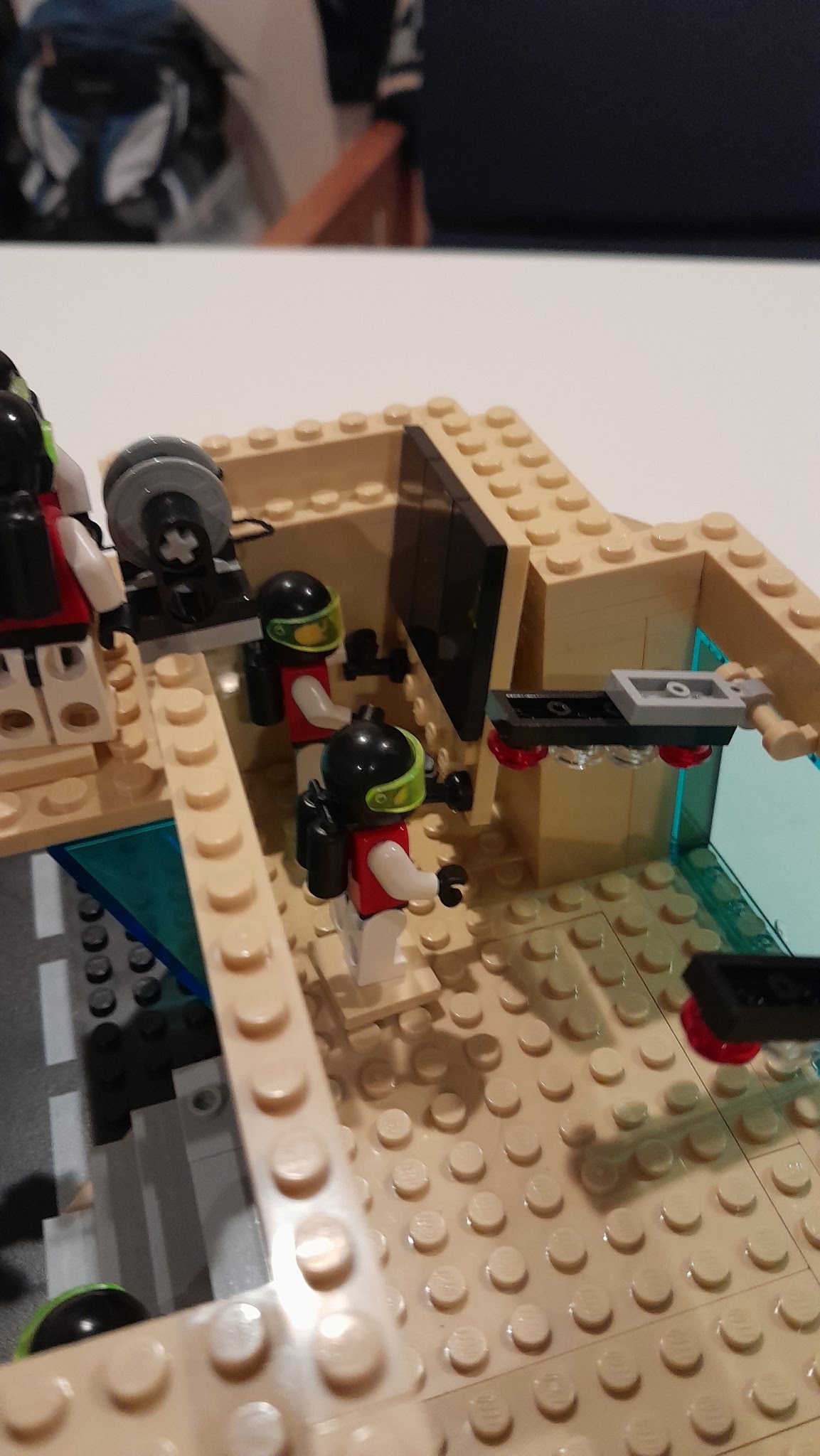
Floating Platform - Maintenance Shed


I have taken this as far as it is going for now.  I have other work to do and this is in a state that I am happy with.  Also it will give me some time for the design to sink in.

I am leaving the left side "under construction".  Adds some interesting detail.  Also until I am showing at any event with a "dark mode" (turning off the overheads to show the lighted models) there is no rush to finish the left flood light.

One thing this picture highlights is that there will have to be lighting.  If you look a the right side, you can see one Minifig sitting at the window, but you cannot see anything other details in that area.  One LED light in the ceiling will make all the difference.


Here is the back side before the glass is installed.  As you can see from these two pictures, there is not much room for added detail.  The area behind the seats would not allow for any detail texture in depth.  This may be why Lego has used decals/stickers on the large panels.

This shows exactly the same problem of trying to add detailed texture in depth.


More closeup shots.


The backside with the rock formations, glass windows installed and the two satellite antennas.

That is all for now.  More software development is order.


Tuesday, August 1, 2023

Floating Platform - Cargo Packs


 I received all the parts for my cargo packs.  In this picture you can see the three different types of cargo packs.  There is a Blue one, a Lime one that follows the standard color scheme.  But I did 2 of the Bright Green, something special.

This is a closeup picture of the Blue ones sitting in a corner of landing platform.

This smaller one, was done with transparent neon green and will fluoresce under UV/Blue LED light. This ideal for dangerous cargo.

Here is the open end on the connector plate.  This open end is toward the front of the display, that is closest to the viewers.  Right now there is a returning scout vessel in the right corner.  I am thinking of turning this open end of the connector plate into a delivery dock.  This picture implies the four cargo packs were just delivered.  Where the scout vessel is now, I would put a small crane to lift the cargo packs from the delivery vehicle and on to the platform.


This is just a wider view of the area.  


Monday, July 31, 2023

Light Buddy 2 - Update1

Light Buddy 2 is almost done now.  As previously noted here and here, the software and firmware are very close to being finished.  The picture above shows the addition of two new development tools for Light Buddy 2.

First is a six channel LED display.  This allows you to work on the lighting scheme, whether it is a static display or a  script, and test it.  

This is a communications interface.  This will allow a USB port on the PC to control the Light Buddy 2.  Using the Brick Controller PC software you can setup a static light scheme or you can download/retrieve a script.  This makes configuring the the Light Buddy 2 quite easy.

Obviously you only need one of each to setup an infinite number of Light Buddy 2s.  


Friday, July 28, 2023

Software Progress


There is progress.  In this post I talked about interconnection of the LED lighting control and to some extent the Motor control. So I thing I am about at the 98% point.  Both the Brick Buddy 3 and the Light Buddy 2 are working at the same level.  This includes both PC control and Scripting.  I need to some more testing of the script interface, especially the loading of a Script, but after that I may declare victory and move on to the Android software.

The Light Buddy 2 implementation was much easier and went relatively fast. 

This is the LED Control GUI.  You will notice that is very similar to the first picture in the post.  The programming method used is that the GUI controls everything.  The GUI offers what the capability of the hardware is.  All of the underlying programming and communication knows nothing about the hardware.  There is a limit set on the number of LEDs and Motors this software can control and going beyond that makes no sense in the context of what this product set is intended for.

As an example, the Light Buddy 2 has six LED channels it can control and all of the are identical.  The Brick Buddy 3 has ten LED channels.  Nine of them are identical.  The LED 10 is just ON/OFF.  The GUI in the first picture shows that the Features and the Brightness are not available for LED 10.  The drop down control also only has OFF and STEADY in the box.  But after the choice is made for LED 10, the underlying software and firmware in the hardware, has no idea that there is a limitation.  

The Microchip PIC firmware is built on the same premise.  There is are multiple common modules that implement the control.  This control then passes through an abstraction layer in the firmware that implements the control on the hardware.

The scripting follows the same concept.  If the capability is not there, it is not available in the GUI.

I am hoping that this common interface will it make much easier for individuals to use this.


Thursday, July 27, 2023

Brick Fest Live - San Diego


Well it is about month to go befor the next Brick Fest Live event.  This time we will be in San Diego CA, Aug 26 and 27 at the San Diego Convention Center.  You can buy tickets here.

I have been expanding the floating platform and improving the cliff wall.  I will be posting more on these features in the weeks and days prior to Brick Fest.

For now let's keep building.😀

Wednesday, July 26, 2023

Floating Platform Detail


This is going to be a quick update and mostly pictures of what is happening on the floating platform.  My intention is to add one more landing pad and this T-Interconnect.  I spent some time working on the control building that will sit on the T-Interconnect.  

First off it is easily removable as this shows.  There are only four studs on each side that connect the building to the plate.  The raised area in the back and just behind the stairs will self center the building when attaching.  The main reason for this is transportation.  It is much easier to move the plates on their sides.  Thus the building must detach.

And now for some pictures.

This is a picture of one side with the surface texture applied.


These two are the other side.  You will notice that the bule power tank is half empty, as indicated by the clear section.

This is the back.  the entire landing area was cut out of the rock, only this section still shows the rock surface.

Here the Maintenance Team is working on connection the flood light.

And these two are installing one of the large screens.

The engine test stand from the last post, in the setup position.

The engine test stand deployed for testing.

A scout ship coming in for landing.

A long view.

A final view.  There is still the entire inside to detail out.  This is still days away from being done.