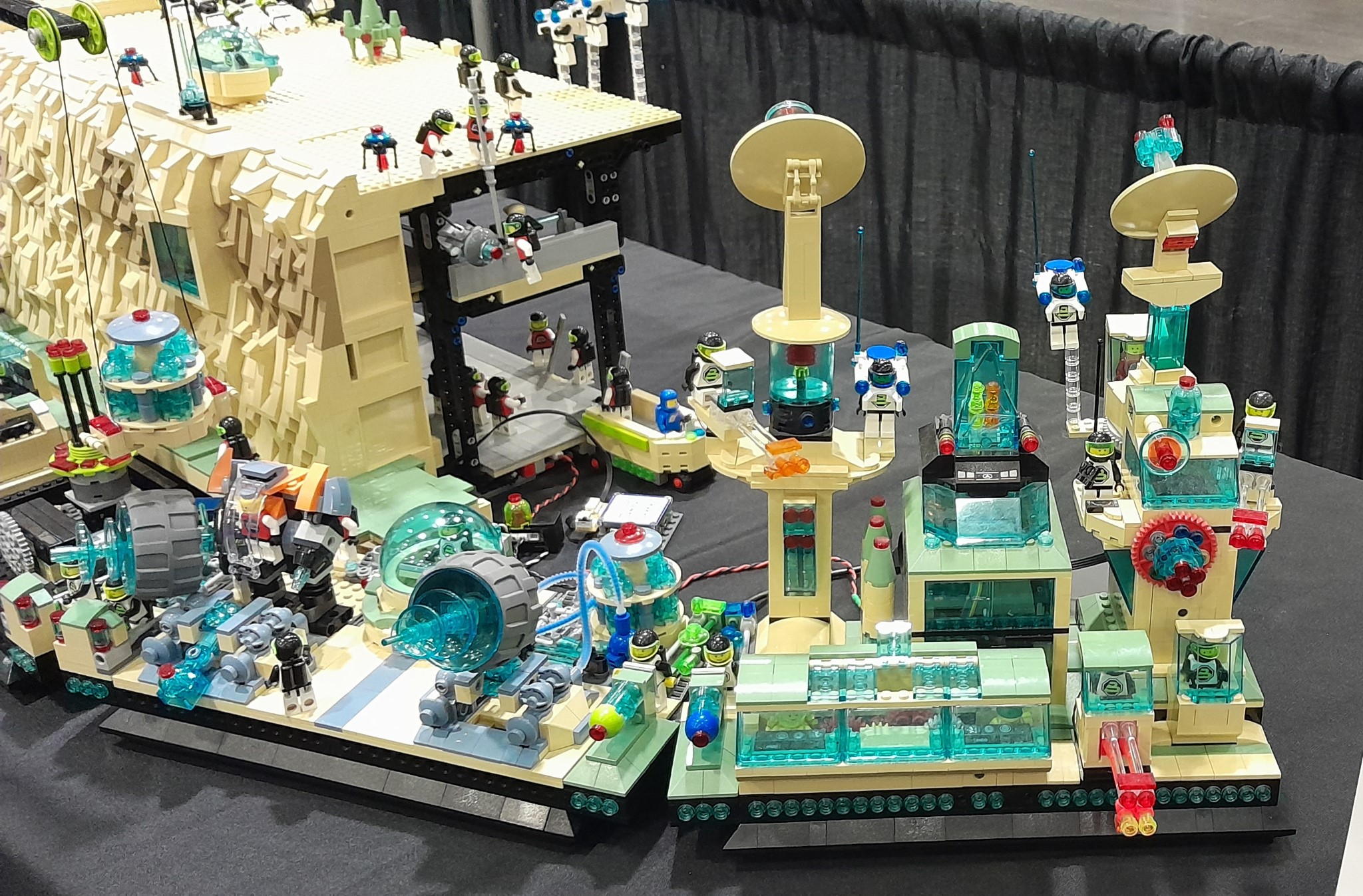
Showing posts with label Brick Buddy Platforms. Show all posts

Sunday, November 2, 2025

Kaos not Harmony


For multiple reasons I am resurrecting what was my second Brick Controller.  This was started in 2019.  But between our moving from the Bay Area and Covid, it never got beyond the original PCB.  That PCB had issues in the design. Here is a link to one post, but there is a whole series of posts in 2019.

The firmware was developed with Harmony version 2.06.  This version is no longer supported. The Light Buddy 1 had a similar processor, a PIC32MX270 vs a PIC32MX470 in the Brick Controller.  The Light Buddy 1 firmware was developed using Harmony version 3.0.

Here is my setup

  • Win 11
  • XC32 4.40 and 2.40
  • MPLAB 6.25 uses PICKit5 and custom PCB
  • MPLAB 6.10 uses PKOB3 on Curiosity PCB
  • Debug using only hardware breakpoints

I took the original PCB and used the Light Buddy 1 firmware as a basis  to start the upgrade in Harmony 3.  The original design with multiple peripherals did not work. I stripped it down to nothing except CORE, UART2, System Console and DEBUG. As long as app.c had nothing in it, the program would generally run. If I added a SYS_CONSOLE_PRINT command or even toggle a GPIO port, then it would throw an exception. Generally 0x07 or 0x0A. For a while it was at a consistent address, but when trying to look at disassembly, the address would move.

I moved the code to the Curiosity board with exactly the same results.  Please note the Curiosity board has a built in debugger.  Also note this is a generation 3 debugger so I was limited to using MPLAB version 6.10.  But this also means the debugger is probably not driving the problem.

But if i just program the custom PCB with the firmware it works as expected.  this includes the toggling of the onboard LEDs and using UART2 for a console message output.

I  tried

  • Slowing down the clock speed
  • No prefetch
  • Longer FLASH wait states
  • No interrupts
  • deleted the linker file and used the default one

and probably a few other things I have forgotten about, since I had been at it for multiple days.

I posted in the Microchip Forum and received and interesting reply.  They suggested I use the following menu item in MPLAB. 


And the debugger starting working, kind of.  In MPLAB 6.25, the debugging process was slow and sluggish.  If I closed out the project and then loaded the project into MPLAB 6.10, it worked more as expected.  Occasionally the exceptions would come back and I would have use the above menu item  

My conclusion is that in MPLAB 6.25 the debugging process leaves some errant code in the processor.  While starting the debugging process erases memory, evidently what gets erased by starting a debug session and what this menu item does, are different.

On to testing everything else. and working on the schematic design of the upgraded PCB.


Monday, September 8, 2025

Brick Lights ONE - Redo

I finally got around to working on this again.  When I first did it, parts availability just killed it.  There were several parts I could not get, including the processor.   I first discussed this here and then a few months ago here, where I discussed a lot of issues with the firmware. Now that has changed, I went back to it.  I made some changes to make it more closely line up with what else I was doing.

As a recap, this was the first iteration.  It has a larger BT module and individual LED connectors.  Looking at the picture at the top, you see that the LED connectors have been consolidated down to three 2 x 5 connectors, which is what I use on the Brick Buddy 3.  Also I have added a standard power connector.  This allowed the entire PCB to shrink down to a 6 x 7 stud size instead of the 6 x 8.

Once I finished this, I sent it out to FAB at my usual fabricator in China.  This right before all the tariff stuff blew up.  I am sure I was not the only one that was trying to squeeze in under the deadline.  Well the PCB that came back had a short between 3.3VDC and GND.  Not good.  After going back and forth with the vendor, they said they found a place where the tolerances were not met. How they missed it, they never said and how my design software did not flag is also a mystery.  Any way drilling out a via fixed the issue.


It required that I put a jumper wire in to power up the section that the drilled out via cut off.  So went on and slowly assembled it one section at a time.  In the very next section, I found another short this time in a signal to GND.  I was not successful in drilling this via out and I called it quits on those boards. 

So I started looking at US sources, the only one that came close was OSH Park.  But that is 3 PCBs.  So I waited to see how this whole tariff thing was going to play out.  The downside to OSH Park is that they do not want inner power planes in negative.  Which has been the standard for years.  I guess toomany instances where the fabricator thinks it is an inner signal layer and does it as a positive.  I redid the inner power planes as signal planes and polygon pours for the power/ground.  We shall see how this works.

Finally it looked like the tariff stuff settled enough, I went ahead and ordered new boards using the signal layers instead of the power layers.


Thursday, May 8, 2025

Just Harmony

                                                                                                                                                                                        Designed by Freepik
 Well after a few weeks of work,   I may be there.  The software component lefty to implement is the script manager.  This is mostly software with a dependency on the Non-Voltaile Memory driver.  Since that is working with the config data, what remains is verifying it works on the larger memory needs of the script manager.

The last problem child was the Bluetooth and the RN487x interface.  First the UART driver did not work anything like the previous model.  As a result the Tx function is blocking, kind of, for now.  Not sure how important that is.  In the RN487x implementation, I wait around for the CMD prompt before executing the next instruction.  I could have the ISR process the flag the main loop when this happens, but this is only important on initialization.  For now I am just going to leave it as an inline process that runs to completion.

The Rx function works like before with an ISR that processed the Rx queue from Harmony.  I did have to use the Ring Buffer  implementation.  The normal implementation required that you submit a read request, instead of just using the call back when a byte came in.

There was another problem, but this had to do with Android software  I had thought I had solved this problem several years ago, but it came back.  It has to do with how many bytes are transmitted when writing a Bluetooth Characteristic.  Once transmit 8 (the maximum I set up), then in that session it will always transmit 8.  If you send 4 bytes, it will just stuff the other 4 bytes with the last 8 byte transmission.  You can read about this issue here.

Time to move on and finish this to the point I can start to assemble the new PCBs.  I have a place for at lest on of these 15 channel LED controllers.


Tuesday, June 11, 2024

Loose Ends #4


For the last month or more I have been working on Software and Device firmware.  I have not posted because this work is extremely boring, except for a very few.  Last summer I embarked on a project to consolidate the all the device firmware and the PC/Android software.  It was extremely cumbersome to constantly have to make the same changes in multiple places.  But this project was much larger than I thought.  But it has made a huge difference in developing new features, since they automatically deploy across all the devices where applicable.

The PC interfaces are now going to be consistent as are the Android interfaces.  The device API will also be consistent.  If the feature is not available on a particular device, a special message will be returned to indicate non-availability.


These are the updated interfaces.  You can see the difference in the Light Buddy 2 interface at the top of the page and this one here.  Brick Controller ONE did not have PWM control of the LEDs or the Motors, so that functionality is not shown.  All the other brick and light controllers have some form of PWM.

More on these updates later.


 In between I have been working on the tera forming and landscaping of the plateau area.  While it is generally flat, there still needs to be some kind of terrain.  This takes a lot of plates and tiles to do.  Once the terrain is done, then it needs to be landscaped.

Finally I have been trying to get the first Light Controller up and running again.  When I did it the first time was right at the start of COVID.  Then all the parts disappeared.  Now that most are back, I am updating the design.


Sunday, February 25, 2024

Another Curved Cliff - Part 4


With the angles decided, I could work on verifying that the wedge plates are in the correct place.  To extend the angle line, the plates have to in certain places.  Otherwise the edge line will parallel, but not contiguous.  I learned this the hard way.

The cliff module on the left is a standard rectangular module.  The one on the right has the angle on the left side and a detachable module to form the angle on the right side.  This detachable module is needed to maintain the ability to fit in the standard container.

Now I working on the backing hanger space.  At first I thought the two modules would each a straight side and angular side.

Here you can see the left module and its angular side and the straight side on the adjoining module.


These two pictures show the left module finished and the beginnings of the right adjoining module.

But that idea did not last.  It became obvious that assembly of the display would be easier if the right module had both angular sides.  This was especially true when having to build the second floor and the top of the backing hanger space. And the right module, was a standard rectangular module.  This picture shows the prototyping of this concept.


Here is the two modules in the process of determining where the wedge plates will go.


These pictures show the final determination of the wedge plate placement.

Here the left module is basically finished and the right module is almost complete.  This is the final fit check.


Here is the left module base is finished.


Wednesday, February 7, 2024

Another Curved Cliff - Part 2

The cliff base behind the module on the right is a straight forward cliff base.  Since the angular portion is on the other cliff base. 
 
Here is the cliff base with the floor supports.

Here are the two cliff bases in place.  It may be hard to see, but so far the angles are lining up.

Here the cliff base flooring is installed. The arrow points to where the wiring will come up from below.  by using the modified brick 1 x 2, with groove (p/n 4216), the groove will form a tunnel that the wire can transverse.

This shows the bottom of the cliff base and where the wire will exit.

This same 1 x 2 modified brick is used in the support wall.  There will have to be some playing with the rock face build and the wire.  Something similar to what I did on the other curved cliff as described in this post.  The wire will enter through the pin hole and this will power the LEDs on the first level.  The wire then comes back out the pin hole and will go to the second level and enter through another brick with pin hole to power the LEDs on the second level.


Saturday, February 3, 2024

Loose Ends #2


Things have been quite busy the last week.  It started with a trip to a used brick store near Roseville CA.  You can see the results above.  This was a 250mile round trip, but worth it.  Including gas money, it would have cost a lot more to purchase this quantity of parts on Bricklink.

But I have been buying on Bricklink.  With Brick Days in Omaha only 6 weeks away, I needed to focus on determining what parts I need to finish the right side curved wall.  The planing cycle is 2-3 days to determine which parts are needed.  Then at least a day trying to find the optimal purchase of parts and shipping costs.  Then waiting up to a week for the parts to arrive, especially this time of year since I am dependent on whims of the Sierra Nevada passes.  So one cycle can easily take 10 days.  That leaves me with maybe 4 cycles.  Planning is paramount.  So I have spend the last week prototyping the cliff and hanger areas in this last area  Now that is done, I can move on.

Finally got around to finishing building out the last five Brick Buddy 3 controllers.  


Monday, January 15, 2024

First Module Rebuild - Part 2


 Progress on this rebuild.  

In the last blog entry, the module looked like this.  I have made some progress.

I used this large motor, mostly because originally I had the space for it.  I still do, so I am continuing to use it.  But I am changing over the drive to a worm gear.  I used to two small bevel bears to change the axle direction 90 degrees, before attaching the worm gear.

A different view that shows the two bevel gears and their arrangement.

Here is the structure installed.  The brick controller will go on one side, probably the blue.  While they look equally empty, the purple side still needs a gear reduction set installed.

Here you can see the reduction gear set installed.

In keeping with the original design, I have two minifigs, one on either end.  They control this portion of the module. The large red gear protruding through the floor is driven by the worm gear.

Better view of the gear reduction set.  Also there is an alternate control panel setup behind the minifig on the right.


This is the completed housing.  It is very similar to the original model.


In the lower left hand corner of the module is connection point for the left tower of the module.  The axle will turn the radar module at the top of this tower.  Unlike the previous version, the wires will run down the tower and into the bottom, where the brick controller will be located.

This shows how the motor was incorporated into the module.

One item that is missing so far is lighting and wiring.  Right now I am just building out the module in rough form.  Then I will determine where the lights will go and how the wires will run through the module.  This will entail some rebuilding to hide the wires as much as possible.


Friday, January 5, 2024

New Year 2024


Break time is over.  We wish all of you a Happy New Year for 2024.

Here are the upcoming topics and plans through at least May.

  • Finally rebuilding the very first module
  • Finish the cliff area on the left side
  • Work on detailing/texturing the top or plateau areas
  • Build the living quarters with bar
  • Finalize Space Outpost ONE for the coming show year
  • Lego Conventions this year
  • Android updates
  • Train updates
  • Finalize all the electronic projects
  • I need to revisit my solar panel on the outdoor shed 

Sounds like a lot of work for someone who is supposed to be retired.

Thus it is

or actually it is back to work 😏