Showing posts with label Light Buddy. Show all posts

Sunday, November 2, 2025

Kaos not Harmony


For multiple reasons I am resurrecting what was my second Brick Controller.  This was started in 2019.  But between our moving from the Bay Area and Covid, it never got beyond the original PCB.  That PCB had issues in the design. Here is a link to one post, but there is a whole series of posts in 2019.

The firmware was developed with Harmony version 2.06.  This version is no longer supported. The Light Buddy 1 had a similar processor, a PIC32MX270 vs a PIC32MX470 in the Brick Controller.  The Light Buddy 1 firmware was developed using Harmony version 3.0.

Here is my setup

  • Win 11
  • XC32 4.40 and 2.40
  • MPLAB 6.25 uses PICKit5 and custom PCB
  • MPLAB 6.10 uses PKOB3 on Curiosity PCB
  • Debug using only hardware breakpoints

I took the original PCB and used the Light Buddy 1 firmware as a basis  to start the upgrade in Harmony 3.  The original design with multiple peripherals did not work. I stripped it down to nothing except CORE, UART2, System Console and DEBUG. As long as app.c had nothing in it, the program would generally run. If I added a SYS_CONSOLE_PRINT command or even toggle a GPIO port, then it would throw an exception. Generally 0x07 or 0x0A. For a while it was at a consistent address, but when trying to look at disassembly, the address would move.

I moved the code to the Curiosity board with exactly the same results.  Please note the Curiosity board has a built in debugger.  Also note this is a generation 3 debugger so I was limited to using MPLAB version 6.10.  But this also means the debugger is probably not driving the problem.

But if i just program the custom PCB with the firmware it works as expected.  this includes the toggling of the onboard LEDs and using UART2 for a console message output.

I  tried

  • Slowing down the clock speed
  • No prefetch
  • Longer FLASH wait states
  • No interrupts
  • deleted the linker file and used the default one

and probably a few other things I have forgotten about, since I had been at it for multiple days.

I posted in the Microchip Forum and received and interesting reply.  They suggested I use the following menu item in MPLAB. 


And the debugger starting working, kind of.  In MPLAB 6.25, the debugging process was slow and sluggish.  If I closed out the project and then loaded the project into MPLAB 6.10, it worked more as expected.  Occasionally the exceptions would come back and I would have use the above menu item  

My conclusion is that in MPLAB 6.25 the debugging process leaves some errant code in the processor.  While starting the debugging process erases memory, evidently what gets erased by starting a debug session and what this menu item does, are different.

On to testing everything else. and working on the schematic design of the upgraded PCB.


Wednesday, September 10, 2025

More Harmony


Before getting here, there was Kaos again.

This all started with the Light Buddy 2 firmware development.  When I did this first time, there were several functions that were never quite finished.  In particular the three digital inputs and the analog input.  The digital inputs I had done on the Brick Buddy 3, so that was just a matter of linking in some common code and setting up interrupts.  That went as expected.  The analog port is connected to the ADC in the PIC32MX270.  While I have done many of these ADC implementations in the past.  The ADC modules in PIC micros, continue to evolve.  In particular, lots of hardware implementation of what used to be firmware.  This is good, but can be bad also.

After I got all of the components installed, I set the input to the port at 3.33VDC.  Here is the schematic.  The input is pin 2 on J19.

This is setup to cut any voltage by 50%, thus if 5VDC accidently gets connected, the maximum voltage at the OPAMP input will be 2.5VDC.  As added insurance, there are clamping diodes to keep the voltage below 3.33VDC and above GND.  There is a basic low pass filter on the output to keep any jitter to a minimum.  We will not be looking at high frequency inputs 😉.  I check the inputs and outputs with a meter, On the left side of R36 the voltage is 3.33VDC.  On the right side of R36 the voltage is 1.66VDC.   On the left side of R38 the voltage is 1.66VDC. So far everything is good. 

Well as expected, nothing showed up in the ADC.  My go to here is the IOview in the MPLAB debugger.  When I look at the ADC, it appears it is not even installed in the PIC32.  Trying to change any bit in the ADC was not possible. I could not even turn it on.  Many hours go by with no success either in an a Web search or playing with registers.  Then I saw a register called PMD1.   When you search the data sheet, mostly what you get is a reference to Parallel Master Port Data.  Eventually you find Peripheral Module Disable registers.  

Harmony set these registers to disable the ADC.  So I must have not told it I wanted to use the ADC.  Though some of the firmware for the ADC was installed.  In the process of restarting this project and setting up a new computer I either lost the Harmony configuration file or corrupted it.  I also moved this from Version 206 to Ver 3.  So now ADC is showing input, success.  Well..................

Except what it is showing is 1.88VDC.  The left side of R38 is still showing 1.65VDC, so something is messing with the output.  First thought would have been the JTAG/PICKit pins, since they can be moved on this PIC32.  But that was not it.  With the PIC32, Microchip went a different way with the data sheets.  The part specific data sheet has limited info on the part, you have to dig out the PIC32 master datasheet, which is surprisingly hard to find on their web site directly.  And it is done is sections, so I have been downloading these as I need them.  

Buried in the Input Change Notification section of I/O pins are these little nuggets of info

It appears this applies to Analog inputs as well.  Because once I made sure the pullup and pull down on RA0 was off, it worked as expected and I got 511 as the ADC count, which is what I would expect.  I also got burned by Harmony again, because it's generated code is what set these registers, not sure how it determined what to do.  But going forward I am going to be setting all the pin registers (TRIS, CNPD, CNPU, ANSEL) individually so I can see them, instead of just loading the register with a hex number.  I do this for all the PIC18F processors now.   

 One final note that made this harder.  Using the IOView in the debugger these SFRs,CNFD or CNPU, were shown.  So that never triggered my thinking to look for that.  Plus no one else seems to have run into this problem, since I could not find anything on the Web about it.

 Onto installing the RN4871.


Monday, September 8, 2025

Brick Lights ONE - Redo

I finally got around to working on this again.  When I first did it, parts availability just killed it.  There were several parts I could not get, including the processor.   I first discussed this here and then a few months ago here, where I discussed a lot of issues with the firmware. Now that has changed, I went back to it.  I made some changes to make it more closely line up with what else I was doing.

As a recap, this was the first iteration.  It has a larger BT module and individual LED connectors.  Looking at the picture at the top, you see that the LED connectors have been consolidated down to three 2 x 5 connectors, which is what I use on the Brick Buddy 3.  Also I have added a standard power connector.  This allowed the entire PCB to shrink down to a 6 x 7 stud size instead of the 6 x 8.

Once I finished this, I sent it out to FAB at my usual fabricator in China.  This right before all the tariff stuff blew up.  I am sure I was not the only one that was trying to squeeze in under the deadline.  Well the PCB that came back had a short between 3.3VDC and GND.  Not good.  After going back and forth with the vendor, they said they found a place where the tolerances were not met. How they missed it, they never said and how my design software did not flag is also a mystery.  Any way drilling out a via fixed the issue.


It required that I put a jumper wire in to power up the section that the drilled out via cut off.  So went on and slowly assembled it one section at a time.  In the very next section, I found another short this time in a signal to GND.  I was not successful in drilling this via out and I called it quits on those boards. 

So I started looking at US sources, the only one that came close was OSH Park.  But that is 3 PCBs.  So I waited to see how this whole tariff thing was going to play out.  The downside to OSH Park is that they do not want inner power planes in negative.  Which has been the standard for years.  I guess toomany instances where the fabricator thinks it is an inner signal layer and does it as a positive.  I redid the inner power planes as signal planes and polygon pours for the power/ground.  We shall see how this works.

Finally it looked like the tariff stuff settled enough, I went ahead and ordered new boards using the signal layers instead of the power layers.


Thursday, May 8, 2025

Just Harmony

                                                                                                                                                                                        Designed by Freepik
 Well after a few weeks of work,   I may be there.  The software component lefty to implement is the script manager.  This is mostly software with a dependency on the Non-Voltaile Memory driver.  Since that is working with the config data, what remains is verifying it works on the larger memory needs of the script manager.

The last problem child was the Bluetooth and the RN487x interface.  First the UART driver did not work anything like the previous model.  As a result the Tx function is blocking, kind of, for now.  Not sure how important that is.  In the RN487x implementation, I wait around for the CMD prompt before executing the next instruction.  I could have the ISR process the flag the main loop when this happens, but this is only important on initialization.  For now I am just going to leave it as an inline process that runs to completion.

The Rx function works like before with an ISR that processed the Rx queue from Harmony.  I did have to use the Ring Buffer  implementation.  The normal implementation required that you submit a read request, instead of just using the call back when a byte came in.

There was another problem, but this had to do with Android software  I had thought I had solved this problem several years ago, but it came back.  It has to do with how many bytes are transmitted when writing a Bluetooth Characteristic.  Once transmit 8 (the maximum I set up), then in that session it will always transmit 8.  If you send 4 bytes, it will just stuff the other 4 bytes with the last 8 byte transmission.  You can read about this issue here.

Time to move on and finish this to the point I can start to assemble the new PCBs.  I have a place for at lest on of these 15 channel LED controllers.


Friday, October 25, 2024

Cliff Module Build Part 3


 This video is Part 3 of a Lego Cliff Module Build for the Space Outpost SL ONE.  This video will show how the rock face is constructed.  I also talk about how the wiring is hidden behind the rock face.


Tuesday, June 11, 2024

Loose Ends #4


For the last month or more I have been working on Software and Device firmware.  I have not posted because this work is extremely boring, except for a very few.  Last summer I embarked on a project to consolidate the all the device firmware and the PC/Android software.  It was extremely cumbersome to constantly have to make the same changes in multiple places.  But this project was much larger than I thought.  But it has made a huge difference in developing new features, since they automatically deploy across all the devices where applicable.

The PC interfaces are now going to be consistent as are the Android interfaces.  The device API will also be consistent.  If the feature is not available on a particular device, a special message will be returned to indicate non-availability.


These are the updated interfaces.  You can see the difference in the Light Buddy 2 interface at the top of the page and this one here.  Brick Controller ONE did not have PWM control of the LEDs or the Motors, so that functionality is not shown.  All the other brick and light controllers have some form of PWM.

More on these updates later.


 In between I have been working on the tera forming and landscaping of the plateau area.  While it is generally flat, there still needs to be some kind of terrain.  This takes a lot of plates and tiles to do.  Once the terrain is done, then it needs to be landscaped.

Finally I have been trying to get the first Light Controller up and running again.  When I did it the first time was right at the start of COVID.  Then all the parts disappeared.  Now that most are back, I am updating the design.


Monday, August 14, 2023

MPLAB and XC8 - A Tale of Woe

Where I have been for the last week or so, on another barefoot journey across a LEGO pile with MPLAB and XC8 compiler.  Bottom line,  beware of C compilers claiming improved performance.

My very small Light Controller was depending on the 256 bytes in the EEPROM for config and script storage.  After config storage, that left about 220 bytes for the scripting.  But each LED takes 5 bytes to describe the time, command, state, features and PWM setting.  So a single time slot with all 6 LEDs changing can take 30 bytes.  Thus in 7 time slots all the memory can be used.  I had over 4K left in flash, so I decided to move the scripting there.  I had done this in one of the PIC32s that did not have EEPROM.

And the fun begins.  Harmony in the PIC32 had libraries for doing this, it was fairly easy.  I had written a boot loader for an older PIC, so this cant be that hard.  Well after 3 days on and off trying to make this work, I decided to change course.  Brand new MPLAB project with only the FLASH writing routines and using the MPLAB Code Configurator to generate the FLASH routines.  Their routines were essentially the same as what I wrote.  I could not see any difference that would make it work over what I had done.

But this did not work either.  I spent a huge amount of time trying to debug this with no change.  Then I spent a day reading every FLASH routine posting I could find.  90%+ were using the MCC routines I had generated.  Most problems were related to other things that I had already implemented.  Then I finally found one post where the person could not get FLASH to work.  Microchip told  him to change compilers.  There was an issue in 2.35 and that 2.36 fixed that.  Well 2.36 was a transitory release and I had a choice between 2.40 and 2.41.  Knowing that x.x0 and x.x5 is Microchips release schedule and any other numbers are bug fixes, I went with 2.41.  And what do you know, the dedicated program started writing to the FLASH.

Could it be that simple, of course not.  Compiled the Light Controller and it still failed.  Now to be fair I had slightly rearranged the MCC generated code to fit my overall structure.  So I went back to the dedicated program and pointed all the FLASH routines at my revised code.   Also renamed all the FLASH routines in this dedicated program directory so there was no way they would be included.  And it works just fine.  I then made sure the configuration bits were the same in both programs.  The last thing I did was copy the oscillator startup code from the Light Controller to the dedicated program.  Still works.

Startup code, project properties, compiler settings were the first things to look at and these were all the same.  Something in the startup code?  I cut out the test routine of the dedicated program and placed it as far in the front as possible.  Still would not work.  At this point almost a week has gone by and I am getting no where.  I have been taking breaks to work on other things, one to clear my mind and two to have some sense of progress. 

At some point I remembered some quirky things I had read about EEPROM unlock sequence.  Back to the dedicated program to trace through the assembly code to see how that worked.  The unlock sequence is 0x55 then 0xAA then set the write bit.  The green is the C code and the rest is assembly.  Nothing exciting here, what I would expect.

Then to trace through the Light Controller.  Both are using the exact same code base, there is no difference, no #ifdef, no changes at all.  There are two differences, either of which could cause a problem. Line #187, the BANK command.  Why is that there, that should have been before the sequence started.  Then the real problem is Line #193, another BANK command and inserted just before the write bit.  My understanding is that the unlock sequence is timed and set for exactly 5 instructions.  At a minimum, setting the write bit has to be the next instruction after loading 0xAA.

After some more reading I came up with this assembly code sequence for the unlock.  The C code using inline assembly is in green.  As you can see the generated instructions are exactly 5 instructions long and it works as expected.  

So after a week of messing around with this, it finally works.  I will probably go back and replace the unlock sequence elsewhere with this assembly version, just to make sure that somewhere in the future the compiler doesn't change it's mind and change the C code.


Thursday, August 3, 2023

Light Buddy 2 Scripting


Scripting is now coming in two forms.  

  1. Static LED that is time invariant
  2. Time based LED action


The time invariant scripting means that the user will setup the LED actions using this screen.  They will assign the LED effect, any features and the brightness (when available).  Using the LED option on the menu, they will store these settings in the Light Buddy 2.  When the unit powers up, it will load these settings and run forever.  This is equivalent to a one line script that is on repeat forever.

Time based is the normal scripting.  The user assigns the LED action at a given time, saves the step, increments the time base to the next event and continues.with the next LED event.

The issue with the Light Buddy 2 is the script storage.  There is no room for an external EEPROM.  The internal EEPROM storage is about 200 bytes once all the configurations data is set.  That leave about 40 script instructions.  But every LED effect takes an instruction.  If all six LEDs change at one time interval, then 6 bytes are used and that would allow for only 6 time intervals. 

There is about 4K bytes of program space left.  If I allocate 1K to script storage, that would allow for four times the storage.  Writing into program memory on a PIC is not difficult, but care must be taken as to not overwrite program storage.  This is my next task, so that I can increase the available script storage.


Monday, July 31, 2023

Light Buddy 2 - Update1

Light Buddy 2 is almost done now.  As previously noted here and here, the software and firmware are very close to being finished.  The picture above shows the addition of two new development tools for Light Buddy 2.

First is a six channel LED display.  This allows you to work on the lighting scheme, whether it is a static display or a  script, and test it.  

This is a communications interface.  This will allow a USB port on the PC to control the Light Buddy 2.  Using the Brick Controller PC software you can setup a static light scheme or you can download/retrieve a script.  This makes configuring the the Light Buddy 2 quite easy.

Obviously you only need one of each to setup an infinite number of Light Buddy 2s.  


Friday, July 28, 2023

Software Progress


There is progress.  In this post I talked about interconnection of the LED lighting control and to some extent the Motor control. So I thing I am about at the 98% point.  Both the Brick Buddy 3 and the Light Buddy 2 are working at the same level.  This includes both PC control and Scripting.  I need to some more testing of the script interface, especially the loading of a Script, but after that I may declare victory and move on to the Android software.

The Light Buddy 2 implementation was much easier and went relatively fast. 

This is the LED Control GUI.  You will notice that is very similar to the first picture in the post.  The programming method used is that the GUI controls everything.  The GUI offers what the capability of the hardware is.  All of the underlying programming and communication knows nothing about the hardware.  There is a limit set on the number of LEDs and Motors this software can control and going beyond that makes no sense in the context of what this product set is intended for.

As an example, the Light Buddy 2 has six LED channels it can control and all of the are identical.  The Brick Buddy 3 has ten LED channels.  Nine of them are identical.  The LED 10 is just ON/OFF.  The GUI in the first picture shows that the Features and the Brightness are not available for LED 10.  The drop down control also only has OFF and STEADY in the box.  But after the choice is made for LED 10, the underlying software and firmware in the hardware, has no idea that there is a limitation.  

The Microchip PIC firmware is built on the same premise.  There is are multiple common modules that implement the control.  This control then passes through an abstraction layer in the firmware that implements the control on the hardware.

The scripting follows the same concept.  If the capability is not there, it is not available in the GUI.

I am hoping that this common interface will it make much easier for individuals to use this.


Monday, July 24, 2023

PICkit 5 First Look


 Greetings!   

Summer always seems to be the hardest time to Blog.  Between wanting to get outside and enjoy the fresh air and surroundings and working (specifically Blogging), the working is losing.  But things are happening.

First as I alluded to in this post, I have had concerns about the state of my PICkit 4.  I only use it on the processors that a PICkit 3 won't work on.  At this time that is 18F46Q71 that I use in the Brick Buddy 3.  It will sometimes get into a state that only a complete recycle of everything(PICkit, target PCB and the entire PC) is needed.  You cannot buy PICkit 4 anymore through distribution/Microchip.  I have become worried that the one I have will fail, which would really hurt my development.  This is the main reason I purchased the PICkit 5.  I am also hoping that it will do better with the new processors.

I installed MPLAB X version 6.10 (required).  I first tested with a PICkit 4 and the PIC18FQ71 Brick Buddy 3.  As stated in the previous referenced post, this combination and Version 6.05 would not work.  But with version 6.10, it worked just fine.  Changing out to the PICkit 5, still works as intended.  Now I have not tried any of the SD Card/BT features, so I cannot comment on those.  But the USB interface to MPLAB X works as you would expect.  In a month or two I will try to write more as I get more experience with it.  I am especially looking forward to using the SD Card/BT to program Brick Buddy's in a MOC.


Tuesday, July 11, 2023

New Brick Buddy and Light Buddy GUI


I have been working on this for far too long now.  But it is very close to being done.  As I explained in this post, I am consolidating the LED Styles and Features. This means common code in the PC, Android and the PIC.  This makes software maintenance much simpler and if I expand the LED Styles and/or Features, it will happen in one place and then ripple out to all the software and hardware.

But there is a lot exclusion.  By that I mean for any given style, only certain features may be available.  Then certain features are mutually exclusive.  Finally certain features and the Brightness selection are mutually exclusive.  

Now writing "spaghetti code" to handle this is quite simple.  The problem becomes keeping it running and finding all the loops that were not planned for.  Thus I have been working on leveraging the features of OOP in the Delphi compiler to build simple but highly structured code.  Also I have been building an abstraction layer that the PC/Android can interface with that will control the LED channels on all of the hardware devices.  Again when I make a change, this should ripple through all the devices.  

Simply put, I need a Combo Box with check boxes.  These exist, but the components are not free.  I went with a CheckList Box that was part of the Delphi component pallet.  I only needed one, since only one can be shown at any time.  Each time the CheckList Box is shown, the data structure holding the LED channel information, populates the CheckList Box with the correct features that can be used (grayed out those that cannot be used) and fills the check boxes that are selected.  When a feature is selected by the user, any Features that are mutually exclusive are unchecked and the Brightness selection is checked for availability.  Sounds simple enough, but at least for me it proved time consuming.  Half the battle was just writing down the program flow.

I finally have a working version for the Brick Buddy 3.  Now I need to port this to the Light Buddy 2.  Then this concept moves to the Scripting language.  How long will this take, not sure.   Up til now it has been slow going.  The brain is not as sharp as it used to be😊.  But progress is made and I suspect moving this to the other hardware platforms will be easier than the first go around.  The scripting language will have some road blocks on the first one, but after that it should go fairly fast.


Tuesday, June 20, 2023

Break Time


 Time for coffee and doughnuts 

We will be taking a short one week break.  One recovery time and two, the family is visiting.  

When we return, there will be maintenance on the entire display that will be needed (several LEDs are out),   Plus three module still need to be updated to the latest Brick Buddy controllers.  Finally I need to finish Brick Buddy 2 and 3 as well as Light Buddy 1 and 2, the PC software and the Android software.  That will take me to August without a problem.  I am sure there are multiple unknown problems ahead.  But they will be solved.

Enjoy the coffee and doughnuts.


Tuesday, June 6, 2023

Brick Buddy Scripting


 After days of working on this I may have made some progress. I had done some scripting work on the Light Buddy 2.  Both use the 40bit (5 bytes) format for a script command.  But it never really worked consistently and in the end I built most of those scripts by hand.  

This is the Script Window in the PC APP.  I have the motor section working.  It provides the ability to attach the corresponding sensor to the motor.  Then you can choose whether to have the motor reverse or stop when the sensor activates.  In a Brick Buddy 3, the sensor will only activate on the state going to ground.  Internally the sensor line is tied to 3.3VDC through a 100K resistor.  I wrote a simple script that turns the motor on and attaches the sensor with Motor Action set to reverse.  It runs until you press the button, which immediately reverses the motor.  This is going to provide some interesting possibilities for MOCs.

Here is the test setup.  A scrap PCB board that I attached four momentary SPST push buttons.  This allows me to test the sensor inputs.

What is missing in the scripting setup is the LED features selection.  I discussed the different LED styles and features in this post.  

On the Main Control Widow, I have a possible solution.  The issue is that the features are not mutually exclusive,  You can have multiple features.  In a traditional Windows Combination Box you can only choose one item.  This picture shows a combination box with individual check boxes for each item.  Thus you area allowed to choose multiple items.  The display of the current selections is not ideal, as you can see to the left of the drop down box.  Also the component does not allow for the drop down box to widen to show the selections.  This feature will require some more research. Ii really did not want to develop my own component, but I may have not other choice.

I did achieve my goal, I have written and installed the script for the Vertical Generator.  The Auto Start now works, so for Brick Fest LIVE, its apply power and it is off and running.  Next task is to do the same for the Vertical Generator.


Friday, March 17, 2023

It was a Cool Idea


A few weeks ago I mused on whether I had a crazy idea or something cool (Oh so 1960s).

Well I think it is very cool, especially in its first incarnation.  The picture above was the 3D rendering of the assembly.  Here is an assembled PCB

This is the size of 1x2 Brick plate. If you solder from the back, as I will in implementation, then a 1x1 plate/tile will fit in the center.  If you solder strictly on the top, then a 1x2 plate/tile will fit.  The four solder points on the right are a little tight and some care will have to be taken when attaching wires.  Using a 250W Weller Soldering gun and 0.1" diameter solder will be challenging.

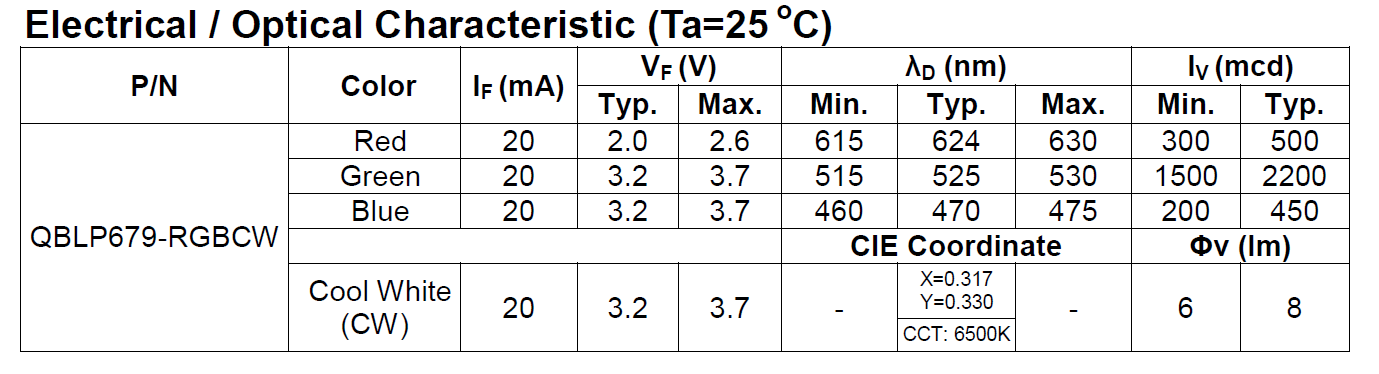
The different colors on this discrete part have different illumination characteristics as shown here.

As I suspected, some experimentation was needed to arrive at the correct resistor values.  I have set a current limit of 15mA per resistor for all of my designs.  Most of the the Light Controllers have a minimum drive current of 25mA.  So the 15mA limit sets a nice margin.  As the chart above shows, the GREEN LED is the brightest of the RGB.  It appears to be equivalent with the white.  The RED has a lower Vf, which required a larger resistor to keep the drive current under 15mA.

I needed something to test in.  I have been playing with this Design.

I started modifying this to accommodate the LED PCB.  First it needed to be in the center of the 8x8 plate.  Then I needed a way to suspend the 2x2 transparent light blue round bricks over the center, so that the light will go straight up the column and out the spire (Antenna 4H) on top.  Finally there was going to be some stack up issues when using plates and bricks and I need a way to extend the round bricks.

Here is the first step.  A 4x4 plate with a 1x1 round plate in the center.  The round plate is needed, since it fits inside the 4 studs at the center of the 4x4 plate. I glued a 1x2 tile on to the back of the PCB.  Since there are no tubes on the back of that tile, it can slide on the 1x1 round plate.  After centering the PCB I placed 1x2 bricks on the left, right side and the top left corener.  I used 1x1 round plates in stacks of three to finish the top section.  This allows the wires to pass through the gaps.  Then at the bottom (in the picture above orientation) I used 1x1 round bricks at the corners and the same stacks of 1x1 round plates in the two center positions.  This was needed to accommodate the wires that I soldered on the top, with the wires coming straight off the PCB.  If I had soldered then from the bottom, then a 1x4 brick would have worked. 

This picture shows the 4x4 assembly attached to the 8x8 plate that is on the bottom and the surround support wall, with a gap for the wires.  Now I need to support the transparent round bricks.  Modifying a brick was a possibility, but then I remembered technic plates.  They don't come in Tan, but I am not sure that matters here.

This shows the technic plate in place.  Next was a mismatch in the round brick height and the large  top (8x8 dish) that goes on top.  The round bricks actually hold this top in place, it doesn't seem to want to grab the studs on the macaroni pieces.  In the stack up that was needed to capture the LED PCB and the technic plate caused the transparent round bricks to be on plate short.  So I placed four light blue transparent 1x1 round plates on the technic plate as the picture above shows.  At first I thought I would have to drill out the technic plate hole to let more light through.  Then these four 1x1 plates sort of restrict it even more.  But as the videos below show, there is plenty of light.

So that brings back to this.

You can see the Light Buddy 2 controller on the right.I am not sure this is the final iteration of this design.  I would prefer to have the controller embedded in the unit.  Four of the six LED Channels are used, so there is no need to have it control other devices.  With some more thought, I am sure I can come up with other uses for those two LED channels.

So here are the videos. The first is in minimal background light and the second is almost full background light.  Unfortunately the camera does not have a large amount of dynamic range in light.  Thus the LED lights tend to over power the camera.  It looks much better live, but these videos give a good indication of what it can do.

Now that I see what this can do, I already have come up with RGB specific effects.  More on that later.

Minimal background light. 


 Full background light.


Wednesday, March 15, 2023

Building Common Libraries

Brick Controller 2

Brick Controller 3

 Light Buddy 1

Light Buddy 2


 I am up to four devices now that have some form of common LED lighting.  Two of which have motor controllers, the basic PWM interface.  As I keep developing new LED lighting effects, going back to each one of these devices and making the changes is getting too time consuming.  Not to mention that I am not getting consistent effects.  

Earlier I started on a quest to make a common library of firmware that can be updated and then automatically apply across all the device platforms.  After a few days of work and frustration 😎, I have achieved success.  Though there is still some testing to be done, but the basics work.  Here is a short description of how I got there.

The two LED controllers I am using right now are LP5569 and LP55231.  I use these because they are mostly firmware compatible with each other.  Though one is a low side driver and the other is a high side driver.  When I am not using these LED controllers, I use the built in PWM controllers in the PIC processors.  Finally when the LED is very basic, either off or on, then the control is the generic IO control of the PIC processor.  Regardless of the driving source, my hardware designs abstract the source away and present a consistent hardware interface of a low side driver.  

Both the LP5569 and LP5231 have I2C interfaces.  These were the only devices in any of these designs that had an I2C interface, thus the I2C driver was intertwined in the LP55xx code. The first step was to extract the I2C driver code and make it a standalone module.  While this was not difficult, it take some time to "unwind" all the code.  Now I can add other I2C devices, without having to include I2C driver code. 

Next was to unwrap the the LED effect (STYLE + FEATURE) from the driving source (LP55xx or PIC).  This meant creating two different modules, one for the LP55xx and one for generating the LED effect.  As has been described in previous posts, the LED effects reduces to a PWM value in either the controller or the PIC processor.  Thus the module I call PWMCtrl, generates this single PWM value for any 100ms time slice.  Then if a LP55xx is the destination, the value is passed to that module for writing into the LP55xx IC.  (Actually because of the way these ICs are set up, all nine channels are updated in a single transfer.  Thus I wait until all the LP55xx LED channels have their PWM values updated before transferring data.)  If the destination is the PIC processor, then it is a simple register update.

The final change was actually splitting the PWMCtrl module into a common section and a local section.  The local section contains all of the device initialization, the cooperative task function and any hardware dependence.  The common section is mostly the LED effects generator.  This code computes the PWM value needed. Thus I now have one place where all effects are calculated, which provides consistent looking effects.  I have not looked very carefully at this split.  There probably is a way to combine these through some MACRO definitions.  But that will be for later.....