Thursday, March 9, 2023

Cliff Wall Interior Update 1


Here is a rendering of the interior of the Cliff Wall for the first floor.  There is still a smaller section above that is located on the same level as the gantry on the hangers.  Here is a closeup of the area around the minifigs.

What do you do with the smooth wall behind the Minifigs and along the sides.  Across the center I placed some brackets.  To those brackets I attached a 6x12 plate.  The upper four rows are covered in black tile.  On the black tile will be a sticker of a radar/computer screen.  The bottom two rows have a 1x6 tile of BLUE and LIME to match this color accent scheme of the entire MOC. That still leaves two 6 x 5 blank panels of wall space on each end.  More brackets with clips and hooks for tools is probably the answer.

One thing that is of concern, is that the Transparent Light Blue windows are locked in place.  There is no way to get behind them and reposition minifigs or other items that might fail.  This wall of glass has to be movable without taking the entire module apart.  Especially these with cliff wall structures on the other side.

I worked on this and here is what I hope is the solution.


The first two pictures show the concept from a long view.  Disregard the Brick pile surrounding the MOC, just some excess Bricks from building, tear down, building, tear down, etc. etc etc. The left side uses a 1x4 hinge plate at the top and the bottom.  I then built a pillar that secured the hinge plate in place.


This picture shows the large screen area in the back.  The pillar on the right is the latching mechanism.  


These two pictures show a closeup of the latching mechanism.  Positioning the clips was time consuming.  Plus I have never liked stacking 1x1 plates or bricks.  Keeping them straight is difficult.  The pillar required some work to get it stable.   

Using this as a base, I went back into Studio and updated the design without part restrictions.

This shows the two pillars for the moving window.

This shows the latching mechanism.  By using part 30241b

instead of 

we get a less of the 1x1 plate issue not lining up correctly.

Is this final?  Cannot answer that question right now.  What I do like is that this arrangement gives depth to the front of the model, which is always good. But at some point I need to start building out, the end of April if fast approaching.


Wednesday, March 8, 2023

Crazy Idea or Something Cool


Somehow I either bought or acquired these LEDs from somewhere.  They are RGB plus white.  Regardless of how I acquired them, they very similar in package to these.

I designed a similar PCB, 8mm x 16mm or equivalent to a 1 x2 plate/tile, which is what the picture at the top of this blog post is.

This LED can do RED, GREEN, BLUE, or WHITE or any combination thereof.  Now the downside to this is it will take up to four LED control lines to do this.  What I don't know yet is how bright these are.  Some of that can be compensated for with the individual resistors.  I suspect some experimentation will be needed to balance out the color intensity.

Here are three ideas so far.

  1. In the Space Base that ability to switch between RED and WHITE (or WHITE and any RGB LED).  So a working space can be in WHITE light and then when activity is about to change, the LED will switch from WHITE to RED.  Now this can be done with two LEDs, but there is some convenience of having just one device installed.
  2. Using random PWM signals to the RGB LEDs.  This might produce a much better Tesla Effect than just using a single white LED.  
  3. Using RED and GREEN is some kind of stop and go scenario. 

As time goes by, I am sure I will think of other ideas.  While most scenarios can be done with multiple LEDs, the convenience of a single device is very strong. Also if all the LEDs are wired, then the designer will have ultimate flexibility.

 We will see what they can do a week or so.


Tuesday, March 7, 2023

Testing LED Functions


This shows a small test jig, I put together to test the Light Buddy 2.  It was quick, but it kept moving, hence the tape.  Even with the tape, it would sometimes be hard to see the LED.  I use this mostly for developing the firmware that produces the different lighting features.  But I can see how this would be useful for someone who is working on the lighting effects before putting it in a MOC.

So I did this.


This is a small PCB with five LEDs and a 2mm connector on the backside.  I have decided going forward, all LED connections will use a 2mm spacing connector that is 2x5.  Thus I will break up the LED connections into groups of five.  The only place so far that is not true is on the Light Buddy 2, which has six LED connections and thus a 2mm connector that is 2x6.  This can still be used, it is just that one LED will not be connected.  

The reasoning was strictly financial.  The PCB fabricator is still having a $5 special on 2 layer boards.  So I can get 30 boards for that price.  The connector is about $1.  The LEDs and resistors I have.  I am in the process of ordering other PCBs again, so the shipping cost will be shared.  Mostly it is my time to build these.  

Are they useful enough for a $4 to $5 retail price.  I don't know, but I guess we will find out.  As a side note for me, these will also make great demos at shows.


Monday, March 6, 2023

Solar Shed-Close


I am closer to having a working system, but some further "compromises" may still be in order. 😕

The new PIC processor came in.  It did not take long to swap out the PIC18F4525 for the PIC18F46K40.  Went through some configuration issues, but finally got it working.  Since this was a minimal part design, there is no oscillator.  The PIC18F46K40 has an internal Oscillator that runs up to 64MHz.  Nothing I am doing needs that kind of speed.  Thus 8MHz was the compromise speed.  What I did do was up the SPI clock rate to 2MHz.  The MIKROE OLED C will run much faster, but that is good enough.  

Then I started working on the SLEEP routine.  I have not done any very low power work since working on the T-DUST module.  Spent a few minutes reading the data sheet on SLEEP and Watchdog Timers, as well as reviewing what I did in T-DUST.  

On the PIC18F46K40 the way it is implemented on the Solar Shed PCB, nothing runs when it goes to sleep, except the Watchdog Timer (WDT).  And in this configuration, it can only run from one of the low frequency oscillators, whose frequency is about 31KHz.  The WDT has pre-scaler that will give a maximum time of about 256 seconds or a signal about every 4 minutes.

In the main loop, the code will look at the Solar Panel voltage each time through the main loop.  If the voltage is above about 8VDC (subject to change when the system is tested), the code will continue in the main loop.  If it is below this threshold, the PIC will go start the WDT and then go to SLEEP.  When the WDT expires (about 256 seconds), the PIC will wake up.  At this point it will look at the Solar Panel voltage, and if it is above 8VDC, the code will wake up and continue with the main loop, until which time the solar panel voltage falls below 8VDC.  If the solar panel voltage is below 8VDC, the PIC will restart the WDT and go back to sleep.  At this point the SLEEP process starts all over.

I do check to make sure the WDT is the wake up source, if not, then a reset of the entire system is executed.

This led to taking current measurements.  Without making some changes, I can only measure the input to the DC-DC converter that makes the 5VDC, that then is transformed to 3.3VDC by an LDO.  So assuming 100% efficiency in the DC-DC converter, these numbers are the best one would expect.  Reality is they are somewhat worse at 5VDC.

  • Run w/o OLED on  4.5mA @12VDC = 10.8mA @5VDC
  • Run w/ OLED on 12.0mA @12VDC = 28.8mA @5VDC
  • Sleep (OLED is powered but display not on) 2.25mA @12VDC = 5.4mA @5VDC
  • Sleep (OLED module removed) 275uA @5VDC = 600uA @5VDC

There is a 7.5F super cap that is suppose to power the system through the night if the battery is too low.  At 600uA this might happen, but a 5.4mA I have my doubts.  This leaves me with three choices:

  1. Remove the OLED.  It is nice to have to see voltages, but for the 80%+ of the time no one is inside the shed, it serves no purpose.
  2. Do some cutting of traces and install a high side switch on the OLED.  Thus it is only on when voltage display is requested.  Cutting the ground traces will problematic since there is ground plane on both sides of the PCB.  Also not sure there won't be leakage through the SPI and other control pins.  This option is not appealing.😞
  3. Do nothing.  Maybe at 10.8mA, the battery will last long enough to get to the charging opportunity.

So this is a testing processing to see what happens.  Right now it is snowing, so nothing will happen until the sun comes out again.

An interesting note is what happened to the PCB when I removed the PIC18F4525 with the hot air gun and then cleaned the pads with solder wick.  The combination of the two seems to have rubbed off some of the solder mask.  Nothing is critical, but these pictures show the issue.  Not going to complain, paid $5 for five PCBs.  It is a one off.


Friday, March 3, 2023

Brick Buddy 3 - A Start


This is a scaled down version of Brick Controller 2. This chart shows the major differences.

Why this?  Well I needed something smaller that I can put inside as many modules.  There are at least three module that only need two motor controllers.  This replaces the very small individual LED connectors with a 2mm socket, two of  them.  Thus you can use individual 2mm pins or one of the attachment boards I have.  (More on this later)

The other major difference is the processor.  This board uses the PIC 18F series instead of the PIC32.  While there is a USB connector, the PIC is connected via a standard serial (RS232 port).  Right now I have four processors that will fit this board.  All of them can be bought is some form (mostly differences in FLASH Program memory).  This is as opposed to the PIC32 in BC2, which is almost impossible to buy.

Finally the Bluetooth was changed to a 5.0 version.  The RN4020 was hard to find and was stuck at 4.0.  The RN4871 is also hard to find, but I have enough to at least prove out the design.

The design is done and I am in process to get the PCB made and some assembly done.  More as we progress.


Thursday, March 2, 2023

First Look at the Space Base Hangers

Here is what the left side (backside looking forward) hanger configuration is looking like now.  I have done some major renovations on this to make it more stable and more supportive of the roof area.  The roof area is the top of MOC as shown here.  (This view is 180 degrees out from the above view.)

 
The gantry area has sufficient room for minifigs.  One thing I am not pleased with yet is the railing.  I have used this design elsewhere (as shown below), but I am still not sure this is the best choice.  There needs to be something.  You can 't have the gantry open to the floor, not realistic I picked this design since the transparent light blue went with the glass structure elsewhere in the MOC.  But it seems to "heavy".  Something much lighter would be better, but I have not found anything yet.  

The only alternative design I have that might work are these.  These are an interesting idea at least. The issue here is that this will blend into the flooring which is also the same light bluish gray.


Something to think about 😒


Wednesday, March 1, 2023

Solar Shed - Epic Fail


This is very embarrassing.  The new PCB for the Solar Shed has multiple problems and they are just dumb mistakes.  I can't believe I did not catch these.  So here is the revelation of what happened.

Digital vs Analog Inputs

The PIC18F4525 is an older PIC.  During the design process, there was a nagging issue in the back of my mind on how the ADC actually connected to the I/O pins.  Early on in my designing with PIC processors (PIC16F876 and PIC16F877), I was burned by an issue with the ADC.  I did a cursory look at the PIC18F4525 data sheet but could not find anything that was out of the ordinary.  When I was changing the firmware to accommodate the PIC18F4525, I finally found it, but this was after the PCB arrived in hand.

This is an excerpt from the PIC18F4525 data sheet.  This is one of the registers that controls the ADC.  In particular look at Port Configuration Control Bits.  These four bits determine which I/O ports are digital inputs and which are analog inputs.  But you don't have complete freedom.  This is a cascading implementation.  As an example if you need AN5 to be analog, then AN0-AN4 also have to be analog.

As time went along in the development of the PIC18F processors, the Port Configurations Control Bits were expanded inside the ADC registers to have a bit for each input.  Then when more analog features were added and the ADC inputs were expanded to almost every I/O pin, the Analog Select (ANSELx) registers appeared, one for each PORT (A-E) on 44 pin parts.

Well if you have not surmised already, the three inputs that I used are AN5-AN7.  That means the I/O pins AN0-AN4 are also analog inputs.  This translates to RA0=RA3 and RA5.  I did not use RA5 and RA0-RA3 are used for i/O control of the OLED display.  What I should have done was finish the firmware changes for the PIC18F4525.  That way I would have run into this before I submitted the PCB design.

SPI Connections

Next issue is even more embarrassing.  I did not correctly connect the SPI to the OLED.  The PIC18F4525 is before PPS (Peripheral Pin Select) which let you have some flexibility on moving PIC functions to different I/O pins.   As you can see from the schematic snippet below, I built the symbol correctly as RC3-RC5 are labeled with the SPI pins.  I just did not connect the wires.  This is mostly a cut and paste failure.  I copied this circuit from a previous design that used a PIC18F47J50 that had PPS.  Somehow in the process of checking this, it went right by me.

Solutions:

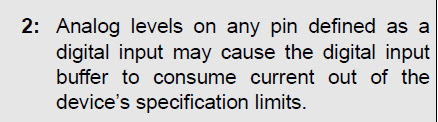
  1. Software fix:  Since I use the ADC every few seconds and the OLED display is strictly user initiated through one of the push buttons, I could change these four bits in ADCON1 to reflect current usage at the time. However there is this warning (shown below) in several places in the data sheet about having analog inputs on a digital input.  And even if I pursue the software fix, the SPI issue will have to be a "cut and jump" approach.

  2. New PCB:  So I only paid $5 for five PCBs and $27 to ship it and 3 other PCB designs.  Total cost was about $12 for the five PCBs.  So I am not into it for a lot of money.  This is just a time factor.  Redo the design, submit and wait for delivery.
  3. New Processor: I was trying to use existing parts I had.  I have other 44 pin TQFPs on hand.  All of them are USB devices and thus have a slightly different pin usage.  Mostly the USB pins and internal regulator that needs a capacitor on the pin.  Not a good choice.  So I started looking at what other PIC18F processors come in a 44 pin TQFP.  The parameter tool on the Microchip website was not as good as it used to be.  It is pushing newer parts that are not what I am looking for.  What I need is a basic 44pin TQFP with PPS.  So I went to Digi-Key and used their search tool.  What popped up was a PIC18F46K40, which is the next FLASH size down from the PIC18F47K40, the part in the HPC Curiosity board this all started from.  The difference is 64K vs 128K FLASH program space.  And it was $2.50 in quantity 1.
     

Where am I, well I am thinking of the PIC18F46K40.  This time I am going to do all the software changes first and make sure the current PCB layout will work.  If that works out, then I will buy two PIC18F46K40s and go from there.  If not, then it may be hacking up the board to make it work.  I only need one.