Showing posts with label PIC18F25K50. Show all posts

Wednesday, August 26, 2020

Bluetooth Integration

I have been distracted again by my life, but integration does go on, just slowly.  I soldered down the RN4020 module to the prototype.  It works, sort of.  It is flaky on starting, as in sometimes it starts and sometimes it doesn't.  There is no true power on reset pin. All of the control pins are under PIC32 control and the start sequence is the same as all of the other RN4020 equipped systems I have done.  Not to mention that the PIC32 firmware doesn't always start.  And to make life even more fun, attaching the various serial ports cause issues.  See this post for serial ports.

Using the debugger and the console output seemed to cause different scenarios.  The PICKit3 especially caused different things to happen.  But what I did notice was the code seemed to be caught in an interrupt loop for the BT UART.  Part of the problem was the Harmony initializing code.  I have always cleared all of the flags before enabling the interrupts and disabling any interrupts that dont have ISRs.  Well only part of that was happening.

There are 3 interrupts for the UART, these are Tx, Rx and ERROR.  First the flags were not being cleared until the UART was opened, but at that point the interrupts were already enabled in the SYSTEM_INIT module.  Also the ISRs are not registered until the after the UART is opened. The list goes on.  Again this is a problem with Harmony when you have multiple peripherals, mostly interrupt driven, the order of instantiation has to be carefully reviewed.

I carefully went through the order, made sure the flags were always cleared when going through the interrupt.  Now it is more stable, though we are not still where the PIC18F25K50 firmware is.  This still needs more analysis.  I suspect I need to implement an UART ERROR ISR, just to see what is happening.

Monday, April 23, 2018

Light Controller Firmware (Part 9)

Finally received the test boards for this.  Here are a series of pictures as I assemble the first PCB for test.


A blank PCB


The Red, Green, Blue LEDs are installed

Finally the connectors for the ribbon cable are installed.


 And this is what it looks like assembled.  Finally a short video showing the LEDs cycling through.  Unfortunately the LEDs are very close together and bright.  They are overwhelming the camera sensor on my phone.


The basic on/off functionality works along with the intensity control of each light through the LP5569 PWM feature.  Next I am going to implement the random PWM and cycle functions on a select set of LEDs.  Then I can setup the scripting language to control this.  Finally implementing the programming function of the LP5569.  That is going to be a little more complex.


Friday, April 6, 2018

Light Controller Firmware (part 8)


Well my day job keeps getting in the way.  Once I got deeper into programming the LP5569, it became apparent I needed something to show all the lights.  I built a crude proto that is shown here.


But something more was needed, so I did a quick design with SMT LEDs in an RGB pattern.  This is one capability of the LP5569, so I decided to implement it.  This board will give a user two things, 1) the ability to test there scripts/configurations and 2) a blank board can be used as a breakout board.  A 3D model of the board is shown here.


Due to cost considerations for this proto, the board is 1.25in wide.  (Minimum width for a "bare bones" PCB from PCBFAB Express.).  The final version will be 0.925 in wide or less.   The mounting holes are on Brick Stud centers.

The final issue yet to be resolved is the separate connector for the PIC LEDs.  They probably should be on the same connectors as the LP5569.

My intention is to offer this as development kit of sorts.  The kit will come with two boards, one populated with connectors shown and LEDs and the other board will be blank, plus 3 cables to connect to the Light Controller.

Thursday, March 29, 2018

Light Buddy Firmware (part 7)

Back to the LP5569.  I have been working on this on and off for several days and finding very little info on this.  Dont know if it will help the Maker community, but I will publishing the initialization routines, at a minimum, once I am done.

I started by writing a small set of routines to interface to the LP5569.  Then I started writing an initialization routine, followed by a status routine.  To start the testing I did some very limited writes and reads.  However everything that came back was all zeroes.  Because of the way my I2C routines are structured, I know that LP5569 is ACKing the request, otherwise the routine would hang. (Great for testing, but bad news in production.)  With out a USBEEE to decode the I2C messages, I had to resort to doing the decoding the old fashioned way, with a scope.  The scope confirmed that I indeed was getting back zeroes and that all portions of the I2C protocol was working.

I go back to the data sheet to see what I am missing.  What I was trying to do was map the LEDs to the one of the 3 Control Engines in the LP5569.  While the data sheet is not bad, it does suffer from assumption.  It is obvious that the writer was very familiar with the LP5569 and assumed the reader was almost as knowledgeable.  I had missed in the register definition section that the Engine Mapping registers were READ ONLY from I2C.  So initializing these is a waste of time.  Once I got past this the writing and read back worked much better.

The next problem was setting the PWM state for each of the nine LEDs.  Again writing did not seem to have an effect.  It always return all zeroes.  My first thought is that this was a read only register too.  But it is clearly marked R/W.  So I did a search on the data sheet for all mentions of PWM. In section 8.3..1.2.1 it says
  
"This register cannot be written when the program execution engine is active,which could result in undesirable behavior. Care should be taken to update these registers only when the program execution engine is idle."

Looked at all of the engine control registers and read them back.   All were in the default state, which is off.  The register definitions never mention idle as an Engine state, so this was causing some consternation on my part.

Continuing the search, I found in the section on LED fault detection a sequence listed.  In this sequence, you need to first enable the LP5569 through the CONTROL register (called the CONFIG register in the register summary table) and then set the PWM setting to 100%.  So I switched the order and now I can control the PWM percentage.  A few other setup registers were programed and checked, with success.  Now it is off to seeing if I can actually control the LEDs.

Wednesday, March 28, 2018

Light Buddy Firmware (Part 6)


Got some what side tracked by my day job. After the little problem with the I2C address and the fact that my UBEEE died on me, I decided to work on the PIC controlled LEDs and the sensor inputs. Here are several pictures of the unit with the sensor input attached and the LED output attached.  You will notice in the second picture that the sensor board attaches to the top of the Light BuddyTM , a nice byproduct.


The LEDs were straight forward.  They were up and running quickly using the code from the Brick Buddy.  I am not happy with the performance of the two PWM LEDs,  These are randomly generated pulse widths, which in turn give a random brightness to the LED.  While one works as expected, the second one seems to have less range of brightness.  The two channels are setup identically and programmed in the same loop.  So this is somewhat of mystery right now.  But there are bigger problems to tackle right now, since I am convinced this is not a hardware problem.

The sensors were also straight forward.  The three switches are Interrupt On Change (IOC) capable and a simple interrupt routine handled all there state.  The POT tool a little longer, acutally had to get the scope out to determine what was what.  But after making sure that all of the bits in the path were set correctly, it started delivering data.

This part is now finished and it is back to the LP5569.

Tuesday, March 27, 2018

Light Buddy Firmware (part 5)

After installing the LP5569 on one PCB the other day I have been struggling for two days to talk them.  Being 4x4mm 28 pin parts, I decided to use the reflow toaster oven to put these parts down.  While I could not find any shorts, there was no acknowledgement.

This forced me to get out my USBEE device to look at the I2C bus to make sure it was doing what it was supposed to. It confirmed that no ACK was coming back, but that the data coming out of the PIC was OK.

What I did notice though was that while I was only reading this address, the display was showing either a read or a write depending on which chip I was trying to address.  That is not right.  I went back to the data sheet to look at addresses.  Most of my experience in I2C has been where the address is in 8-bit format and the Bit 0 is not used, so you just put the address in as listed.  As you can see from this figure, that is not the case with the LP5569.  The actual byte value used needs to be shifted left one bit. 

The lesson here is to always READ THE DATA SHEET first.

Sunday, March 18, 2018

Light Buddy Firmware (part 4)

Achieved all of the basic functionality, internal EEPROM, timers, USB, and the support structure.  Tested all the features and they look good.  What I like to do on each one of these is test the timer routines to make sure all the arithmetic was correct.  You would think after about 30 of these PIC implementation, I would have this down, but I continue to surprise myself with stupid mistakes.

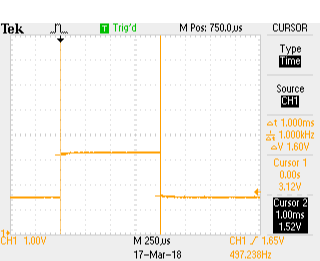
Here are three scope shots that show the pulse width for the 1ms, 10ms and 25ms timer settings.  I use the timers in both a blocking function and as an interrupt driven timer.  The PIC18F25K50 has two 16 bit timers that I use for this.  The two 8 bit timers will be used for the PWM engines.

Here are the scope pictures.
1 ms
10 ms
25 ms
The timing was not too bad.  If the scope's calculation on frequency is correct then the actual timing was

1ms    => 1.005555ms  or 0.5555% error
10ms  => 10.01645ms  or 0,1645% error
25ms => 25.05286ms  or 0,21145% error

This is good enough for timing the light s on a MOC.

Next is to install the LP5569 LED controllers and get the I2C bus working.  Never used these before so it should be interesting.  Plus these are very small parts, so installing is going to be fun.

Saturday, March 17, 2018

Light Buddy Firmware (con't)

Back after looking for bad solder connections and the like.  I made a few last minute changes when laying out the PCB, to make the routing more straight forward.  One of these was swapping the labels for RB5 and RB6.  Well RB6 is part of the In Circuit Serial Programmer.   The fix required cutting a trace and jumping one via to a trace.  If you look real close at the PCB, just to the left of the PIC, you might be able to see it.  Need to use one strand of a 28AWG stranded wire to do the jump.  The via holes are only 10mils.  Here is a better look.

Now it connects and the bootloader loads.  Maybe now we can get somewhere.

Light Buddy Firmware

Here is the minimal built Light BuddyTM , that we will be using to bring up the firmware.  First step is to connect the PICKit3 and program in the bootloader. And it did not work.  The PICkit3 could not recognize the connection, NOT GOOD.


Light Controller PCB Assembly

Received the PCB and started building it up.  Here is the blank PCB.


My usual bring up of a new design is to install the power section and the USB connector, then test the power for shorts and opens.  Once I see all of the power rails up and running I will move on to components.  This is to prevent any component waste..

Here I have installed the PIC18F25K50 and its supporting parts.
Just to the left of the processor is a pattern for a TAG-Connect programmer connection.  In these tight spaces, I find this is the best.  Since I usually use the HID Bootloader methodology, I use this connection once to load the bootloader and then use the USB interface for all loading and debugging (traditional printf statements).

Now it needs to be mounted so I can use it for programming.  This device was designed to sit on a 6x8 plate.  So I drill out the four corners with a #43 drill bit (2-56 body clearance).  I use the partial holes on the back side underneath the studs as guides.

This puts the holes in the center of the studs as this picture shows.


Next step is to assemble the PCB to the plate.  I use 1/8" ceramic spacers for minimal clearance and 1/2" long 2-56 flat head screws.   This can be problematic trying to keep the screws in place while trying to assemble the spacers, PCB and then the nuts, as this picture shows.  Two of the screws have popped out of their holes.

So once the 4 screws are in place, I place a another 6x8 plate on the bottom as shown here.  This forces the screws to be seated all the way and makes it a lot easier to mount the spacers and PCB.

This picture shows the mounting plate with screws and spacers ready for the PCB to be attached.  The other 6x8 plate is holding the screws in place.

And finally the PCB is attached.


Now it is on to programming.


Tuesday, March 13, 2018

Lighting Controller Inputs/Outputs

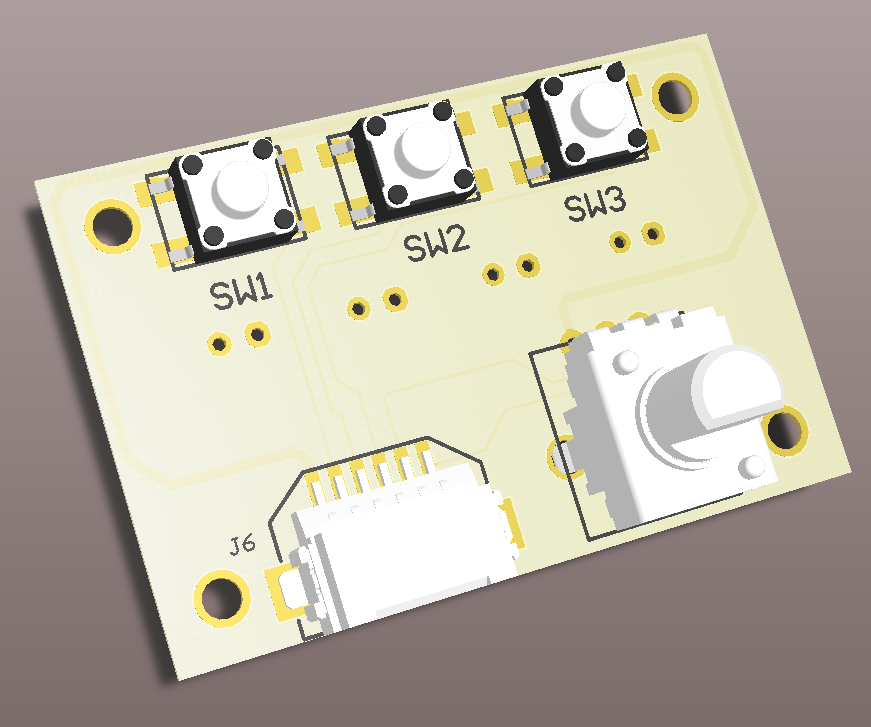
To make it easier to control the inputs to the Lighting controller, I am making a small board with three small push buttons and small potentiometer.  As in the Brick BuddyTM , there will be a script function to wait on one of these three inputs and then do something specific.  The potentiometer will be used to vary lighting levels, PWM rates and burst length and randomize effects.  Obviously it can do them all at the same time, but each model will be different and thus will want different effects.  Here is the front side with the input controls.

To save costs, this board will be dual function.  One side will do the input function, as shown above.  The other side will be the output connector for the two PIC PWM controllers and the two ON/OFF LED controllers, see below.  The assembly will be one or the other and not both, at least not right now.

The above are 3D models of what these look like. My only issue with the design is the connection of the outputs.  Right now these are standard 0.1" spacing connectors.  You can either solder directly to the PCB or put in 2 pin connectors and connect to them.   Could put in the JST type connectors used by the LiPO batteries that are popular on the Maker Sites.  but building mating cable connectors is difficult.  In the end, it seems easiest to just wrap wires around post.

Friday, March 9, 2018

Light Cotroller PCB

Finished the prototype of the light controller last night.  Here is the PCB model.

The functionality that finally got implemented is as follows:
1. The six LP5569 LED engines were spread across the three connectors on the left, each one has two.  There are 3 LED connections per engine for a total of 6 LEDs and 4 power connections.  The connector is a standard 10 pin header and any PC 10 pin ribbon cable can be used to connect the LEDs.
2.  The connector on the bottom has the two PIC PWM engines and the two ON/OFF LEDs plus two power connections.  This connector is a the same connector used to power the Brick BuddyTM . I will have more on this later this weekend.
3.  The input control was changed to three ON/OFF type contacts and one analog input.  This way you could set the brightness or the blinking rate or who knows what I will dream up.  Again uses the same 6 pin connector as #2 above, with these four inputs and power/ground.
4.  Included a RN4020 BLE module, though I will probably not implement the firmware at this time.  This is more of a set it and forget type functionality, at least now.

The PCB fabs should be back next week, so maybe by next weekend something will be up and running.

Monday, March 5, 2018

New Light Controller (Update)


Here is the basic block diagram for the Lighting Controller.  Looks like a lot of LEDs, but to recap what is driving this.  My first battle fort had three blasters, two with 2 barrels and 1 with 4 barrels.  Then it had two power generator LEDs, one with 2 LEDs.  Finally there were two other flashing LEDs on the MOC.  That totals to 13 LEDs and ideally 6 independent controllers  I would have put in more lights, but the Brick Buddy only went had 4 independent controllers and only one had a PWM controller on it.  This is what is driving this design.

Decided to use a pair of TI LED controllers in addition to the two inherent PWM controllers inside the PIC.  The LP5569 allows for three LEDs per controller, which is 9 actual LEDs.  The IC will sink up to 25mA per  pin, so that up to two LEDs could be attached per pin with a load sharing resistor of 10 to 20 ohms.  Thus this design has up to 8 independent LED controllers.  In addition (and not shown) is two ON-OFF type signals that can sink >100mA each.

Connectors are always problematic in this type of design.  One goal is to make it small, but with all of the LED connections, this becomes difficult.  So for the 18 LEDs on the two LP5569s, I have decide to go with three standard 2x5 10 pin connectors.  These are the standard PC serial connectors and allow for use of off the shelf connectors and ribbon cables.  Still requires either soldering or twisting/taping wires.  But LEDs in a MOC can be anywhere and including a connector for every LED would take alot of room and be prohibitively expensive.  This way I don't burden the person who only wants a few LEDs with the cost of 18 single connectors.  The other two connectors use the standard 6 pin on the Brick Buddy which allows me to use those cables for other purposes.  One will connect the the sensors and the other will connect the two PIC PWM controllers and ON-OFF LEDs.

There are 4 digital sensor input and one analog sensor input.The digital sensors are all interrupt on change inputs, so the controller should be responsive to input.  The analog input would be used to vary the lighting effects, not sure how, but it is completely a frimware issue. I have some ideas for a companion board that will have a few buttons and a potentiometer on it along with some connectors to mate out to the standard power functions connector.  This will allow for standard input functions to be used.

As mentioned in the previous post, the BLE module will be optional.  I probably will not start work on the Android interface until after Maker Faire is over.  The goal would be to show a working interface at Bricks By The Bay in July.

The PCB layout has begun and right now it looks like it will all fit on 6x8 plate with a 4x8 plate on top.  This will allow for the LED lighting connectors to be exposed.

Thursday, March 1, 2018

New Light Controller

After building the first single platform MOC, it became obvious that four light controllers are not enough as the MOC gets bigger.  Therefore I am working on a new Brick BuddyTM , Light Buddy.  The basic functionality is 8 to 10 light controllers, with at least 8 of them under PWM control to provide some unique lighting effects.  Additionally a few that just power on when power is applied.  Finally some input lines that can be used to control the lights through interaction with the user or the MOC.  All of this is to be powered by a USB power source.  Optionally it will have a Microchip RN4020 BLE module included.  I am including this now because it might be useful.  But this might change as I am thinking this is more of a set and forget type functionality.

The Windows program will be the same as the Brick BuddyTM , to keep it simple for the user.  If the BLE module survives, then the same will be true for the Android app.

Right now the PIC processor that I am looking at in the 28 pin version (PIC18F26J53) will not have enough GPIO to have inputs, after the LED control, BLE Module and external memory for the user program.  Hope to have a finalized design this weekend.