Thursday, March 15, 2018

Vertical Generator


I started building the vertical generator as a standalone model so that I can test the functionality and figure out how to light it.  The base needs to be tall enough that a minifig can standup and look like they are controlling what is happening, realizing the spinning axle will be in the center.  Also needs to be a roof light so that you can see everything in the control section.  There will be two  minfigs in there. Here is a view of the three main subsections built.
You can see that two minifigs is the max amount that will fit.  The two outboard engines will be used to connect hoses to the platform.
 
The reverse side of the roof of the base/bottom of the top section is shown here.  The astute observer will notice that the square tile has a hole in it for the axle.  Not a normal Brick piece and was modified by me.  Need a smooth surface for the generator to  spin on.

These two pictures show the generator attached to the base.  The top section is built in such a way that only the spinning generator can be seen and not the axle.  The goal is to make it look like it is spinning in space.
The final design with a temporary base.The number of 8x8 dishes on the top is strictly a function of color scheme, the detail effect we are trying to achieve and the length of the axle that needs to be taken into account.  This version only has one dish since the axle used would only go through one 8x8 dis and the final 10x10 dish on the top.

Again lighting this section is going to be challenging.  This needs the random PWM lighting effect I used in the original MOC I did last year.  It would be nice to also to have an LED on the top with a ramp effect which would simulate a rotating beacon.  These will be task for a a later time.

The other item on the top section is should the entire enclosure be trans light blue or should the back piece be tan.  The entire glass effect is nice, but the tan piece allows for hiding wires.  The problem here is that you cannot center the tan piece in the back..So for now I will leave it as all glass and just figure a way to minimize the wires exposure.

I worried that the generator would wobble just enough to strike the enclosure.  Testing to date has shown this not the case if everything is properly seated.
 
Finally here is a short video of it running.


Tuesday, March 13, 2018

Lighting Controller Inputs/Outputs

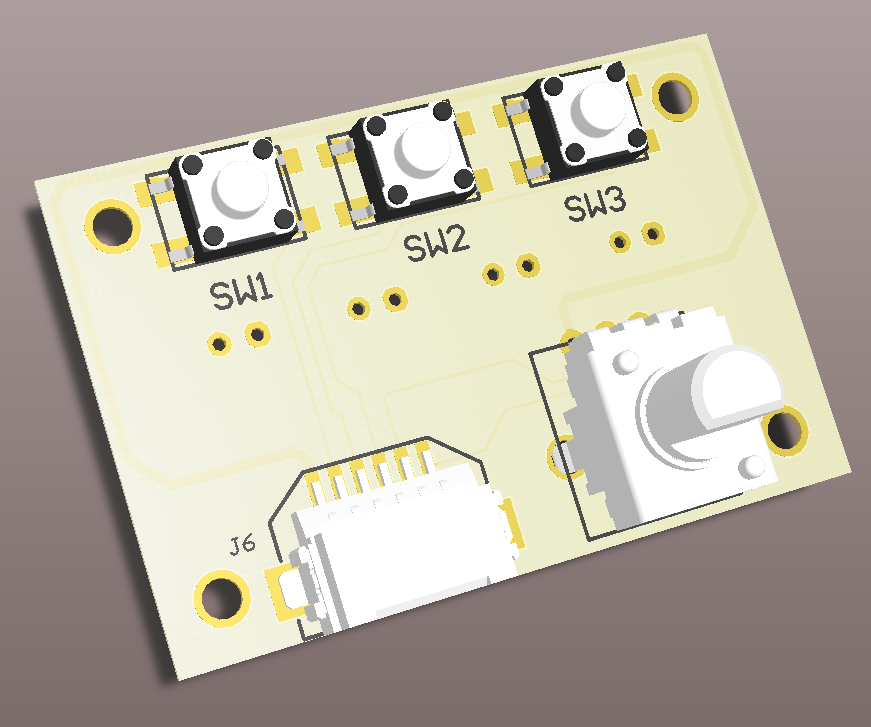
To make it easier to control the inputs to the Lighting controller, I am making a small board with three small push buttons and small potentiometer.  As in the Brick BuddyTM , there will be a script function to wait on one of these three inputs and then do something specific.  The potentiometer will be used to vary lighting levels, PWM rates and burst length and randomize effects.  Obviously it can do them all at the same time, but each model will be different and thus will want different effects.  Here is the front side with the input controls.

To save costs, this board will be dual function.  One side will do the input function, as shown above.  The other side will be the output connector for the two PIC PWM controllers and the two ON/OFF LED controllers, see below.  The assembly will be one or the other and not both, at least not right now.

The above are 3D models of what these look like. My only issue with the design is the connection of the outputs.  Right now these are standard 0.1" spacing connectors.  You can either solder directly to the PCB or put in 2 pin connectors and connect to them.   Could put in the JST type connectors used by the LiPO batteries that are popular on the Maker Sites.  but building mating cable connectors is difficult.  In the end, it seems easiest to just wrap wires around post.

Sunday, March 11, 2018

Horizontal Generator Model

In the post on the First Look at Four Platform MOC I showed the vertical spinning generator model.  The post also showed a horizontal spinning generator.  I acquired four of these trans light blue 10x5 x6 half cones from one of the new Ninjago sets.  I thought they looked intereesting and started playing with how to mount them.  Mounting them back to back was interesting and will discuss this in a later post.  I continued to play with these parts and some 10x10 octagon plates and then finally finished the model of this.  Here is the model in it's current state.

I managed to hide the small gearbox in the middle.  That way the drive will be underneath.  Unfortunately it does not look like the longest axle will span the width, so not sure how that is going to work yet.  Also still playing with the colors, may have to get my two consultants involved with that.  Finally have some ideas for hoses installed to look like power cables coming out for powering the base.

Friday, March 9, 2018

Light Cotroller PCB

Finished the prototype of the light controller last night.  Here is the PCB model.

The functionality that finally got implemented is as follows:
1. The six LP5569 LED engines were spread across the three connectors on the left, each one has two.  There are 3 LED connections per engine for a total of 6 LEDs and 4 power connections.  The connector is a standard 10 pin header and any PC 10 pin ribbon cable can be used to connect the LEDs.
2.  The connector on the bottom has the two PIC PWM engines and the two ON/OFF LEDs plus two power connections.  This connector is a the same connector used to power the Brick BuddyTM . I will have more on this later this weekend.
3.  The input control was changed to three ON/OFF type contacts and one analog input.  This way you could set the brightness or the blinking rate or who knows what I will dream up.  Again uses the same 6 pin connector as #2 above, with these four inputs and power/ground.
4.  Included a RN4020 BLE module, though I will probably not implement the firmware at this time.  This is more of a set it and forget type functionality, at least now.

The PCB fabs should be back next week, so maybe by next weekend something will be up and running.

Monday, March 5, 2018

New Light Controller (Update)


Here is the basic block diagram for the Lighting Controller.  Looks like a lot of LEDs, but to recap what is driving this.  My first battle fort had three blasters, two with 2 barrels and 1 with 4 barrels.  Then it had two power generator LEDs, one with 2 LEDs.  Finally there were two other flashing LEDs on the MOC.  That totals to 13 LEDs and ideally 6 independent controllers  I would have put in more lights, but the Brick Buddy only went had 4 independent controllers and only one had a PWM controller on it.  This is what is driving this design.

Decided to use a pair of TI LED controllers in addition to the two inherent PWM controllers inside the PIC.  The LP5569 allows for three LEDs per controller, which is 9 actual LEDs.  The IC will sink up to 25mA per  pin, so that up to two LEDs could be attached per pin with a load sharing resistor of 10 to 20 ohms.  Thus this design has up to 8 independent LED controllers.  In addition (and not shown) is two ON-OFF type signals that can sink >100mA each.

Connectors are always problematic in this type of design.  One goal is to make it small, but with all of the LED connections, this becomes difficult.  So for the 18 LEDs on the two LP5569s, I have decide to go with three standard 2x5 10 pin connectors.  These are the standard PC serial connectors and allow for use of off the shelf connectors and ribbon cables.  Still requires either soldering or twisting/taping wires.  But LEDs in a MOC can be anywhere and including a connector for every LED would take alot of room and be prohibitively expensive.  This way I don't burden the person who only wants a few LEDs with the cost of 18 single connectors.  The other two connectors use the standard 6 pin on the Brick Buddy which allows me to use those cables for other purposes.  One will connect the the sensors and the other will connect the two PIC PWM controllers and ON-OFF LEDs.

There are 4 digital sensor input and one analog sensor input.The digital sensors are all interrupt on change inputs, so the controller should be responsive to input.  The analog input would be used to vary the lighting effects, not sure how, but it is completely a frimware issue. I have some ideas for a companion board that will have a few buttons and a potentiometer on it along with some connectors to mate out to the standard power functions connector.  This will allow for standard input functions to be used.

As mentioned in the previous post, the BLE module will be optional.  I probably will not start work on the Android interface until after Maker Faire is over.  The goal would be to show a working interface at Bricks By The Bay in July.

The PCB layout has begun and right now it looks like it will all fit on 6x8 plate with a 4x8 plate on top.  This will allow for the LED lighting connectors to be exposed.

Thursday, March 1, 2018

New Light Controller

After building the first single platform MOC, it became obvious that four light controllers are not enough as the MOC gets bigger.  Therefore I am working on a new Brick BuddyTM , Light Buddy.  The basic functionality is 8 to 10 light controllers, with at least 8 of them under PWM control to provide some unique lighting effects.  Additionally a few that just power on when power is applied.  Finally some input lines that can be used to control the lights through interaction with the user or the MOC.  All of this is to be powered by a USB power source.  Optionally it will have a Microchip RN4020 BLE module included.  I am including this now because it might be useful.  But this might change as I am thinking this is more of a set and forget type functionality.

The Windows program will be the same as the Brick BuddyTM , to keep it simple for the user.  If the BLE module survives, then the same will be true for the Android app.

Right now the PIC processor that I am looking at in the 28 pin version (PIC18F26J53) will not have enough GPIO to have inputs, after the LED control, BLE Module and external memory for the user program.  Hope to have a finalized design this weekend.

First Look at Four Platform MOC


This is the first attempt at building a 4 platform MOC.  Not sure where this is headed right now.   Also not sure about the order that I want.  I have used the two angled connectors on the ends and the straight connector in the middle.  One detail I want to model is an energy control station.  The beginnings of this are on the straight connector.  The angle connectors can accept minimal detail because of the angle.  But I have ideas on how to handle.this.

I have been working on the two cylinder designs as spinning generators.  We will see where this goes.  I have modeled what the vertical one might look like here.