Friday, March 3, 2023

Brick Buddy 3 - A Start


This is a scaled down version of Brick Controller 2. This chart shows the major differences.

Why this?  Well I needed something smaller that I can put inside as many modules.  There are at least three module that only need two motor controllers.  This replaces the very small individual LED connectors with a 2mm socket, two of  them.  Thus you can use individual 2mm pins or one of the attachment boards I have.  (More on this later)

The other major difference is the processor.  This board uses the PIC 18F series instead of the PIC32.  While there is a USB connector, the PIC is connected via a standard serial (RS232 port).  Right now I have four processors that will fit this board.  All of them can be bought is some form (mostly differences in FLASH Program memory).  This is as opposed to the PIC32 in BC2, which is almost impossible to buy.

Finally the Bluetooth was changed to a 5.0 version.  The RN4020 was hard to find and was stuck at 4.0.  The RN4871 is also hard to find, but I have enough to at least prove out the design.

The design is done and I am in process to get the PCB made and some assembly done.  More as we progress.


Thursday, March 2, 2023

First Look at the Space Base Hangers

Here is what the left side (backside looking forward) hanger configuration is looking like now.  I have done some major renovations on this to make it more stable and more supportive of the roof area.  The roof area is the top of MOC as shown here.  (This view is 180 degrees out from the above view.)

 
The gantry area has sufficient room for minifigs.  One thing I am not pleased with yet is the railing.  I have used this design elsewhere (as shown below), but I am still not sure this is the best choice.  There needs to be something.  You can 't have the gantry open to the floor, not realistic I picked this design since the transparent light blue went with the glass structure elsewhere in the MOC.  But it seems to "heavy".  Something much lighter would be better, but I have not found anything yet.  

The only alternative design I have that might work are these.  These are an interesting idea at least. The issue here is that this will blend into the flooring which is also the same light bluish gray.


Something to think about 😒


Wednesday, March 1, 2023

Solar Shed - Epic Fail


This is very embarrassing.  The new PCB for the Solar Shed has multiple problems and they are just dumb mistakes.  I can't believe I did not catch these.  So here is the revelation of what happened.

Digital vs Analog Inputs

The PIC18F4525 is an older PIC.  During the design process, there was a nagging issue in the back of my mind on how the ADC actually connected to the I/O pins.  Early on in my designing with PIC processors (PIC16F876 and PIC16F877), I was burned by an issue with the ADC.  I did a cursory look at the PIC18F4525 data sheet but could not find anything that was out of the ordinary.  When I was changing the firmware to accommodate the PIC18F4525, I finally found it, but this was after the PCB arrived in hand.

This is an excerpt from the PIC18F4525 data sheet.  This is one of the registers that controls the ADC.  In particular look at Port Configuration Control Bits.  These four bits determine which I/O ports are digital inputs and which are analog inputs.  But you don't have complete freedom.  This is a cascading implementation.  As an example if you need AN5 to be analog, then AN0-AN4 also have to be analog.

As time went along in the development of the PIC18F processors, the Port Configurations Control Bits were expanded inside the ADC registers to have a bit for each input.  Then when more analog features were added and the ADC inputs were expanded to almost every I/O pin, the Analog Select (ANSELx) registers appeared, one for each PORT (A-E) on 44 pin parts.

Well if you have not surmised already, the three inputs that I used are AN5-AN7.  That means the I/O pins AN0-AN4 are also analog inputs.  This translates to RA0=RA3 and RA5.  I did not use RA5 and RA0-RA3 are used for i/O control of the OLED display.  What I should have done was finish the firmware changes for the PIC18F4525.  That way I would have run into this before I submitted the PCB design.

SPI Connections

Next issue is even more embarrassing.  I did not correctly connect the SPI to the OLED.  The PIC18F4525 is before PPS (Peripheral Pin Select) which let you have some flexibility on moving PIC functions to different I/O pins.   As you can see from the schematic snippet below, I built the symbol correctly as RC3-RC5 are labeled with the SPI pins.  I just did not connect the wires.  This is mostly a cut and paste failure.  I copied this circuit from a previous design that used a PIC18F47J50 that had PPS.  Somehow in the process of checking this, it went right by me.

Solutions:

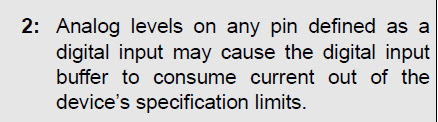
  1. Software fix:  Since I use the ADC every few seconds and the OLED display is strictly user initiated through one of the push buttons, I could change these four bits in ADCON1 to reflect current usage at the time. However there is this warning (shown below) in several places in the data sheet about having analog inputs on a digital input.  And even if I pursue the software fix, the SPI issue will have to be a "cut and jump" approach.

  2. New PCB:  So I only paid $5 for five PCBs and $27 to ship it and 3 other PCB designs.  Total cost was about $12 for the five PCBs.  So I am not into it for a lot of money.  This is just a time factor.  Redo the design, submit and wait for delivery.
  3. New Processor: I was trying to use existing parts I had.  I have other 44 pin TQFPs on hand.  All of them are USB devices and thus have a slightly different pin usage.  Mostly the USB pins and internal regulator that needs a capacitor on the pin.  Not a good choice.  So I started looking at what other PIC18F processors come in a 44 pin TQFP.  The parameter tool on the Microchip website was not as good as it used to be.  It is pushing newer parts that are not what I am looking for.  What I need is a basic 44pin TQFP with PPS.  So I went to Digi-Key and used their search tool.  What popped up was a PIC18F46K40, which is the next FLASH size down from the PIC18F47K40, the part in the HPC Curiosity board this all started from.  The difference is 64K vs 128K FLASH program space.  And it was $2.50 in quantity 1.
     

Where am I, well I am thinking of the PIC18F46K40.  This time I am going to do all the software changes first and make sure the current PCB layout will work.  If that works out, then I will buy two PIC18F46K40s and go from there.  If not, then it may be hacking up the board to make it work.  I only need one.


Tuesday, February 28, 2023

Brick Light Connection


Here is a new connection scheme.  The two pin connector is the white rectangle in the picture.  I was continually frustrated by all the wires running between modules and around the outside.  This way all wiring can be inside the module and this small keyed 2mm connector will provide the USB power for the electronics.  Not sure how this going to work with USB Data connections yet, but for simple ON/OFF lighting and Light Buddy 2, this is perfect.  This next picture shows the USB connection, where I have but the mating 2mm connector on a USB cable.  In the end I have ordered these USB Connectors from Amazon and will build my own out of 26 AWG wire I have.

Here is what they are made of.  These two are actually the same PCB board.  The design intent was to be able to lock this into place so it would not move when connecting to it.  Sine the PCB is 1.6mm thick, I am 1.6mm short of having an exact connection in the Brick World.  So I designed the PCB so that you can have two configs, depending on how much support is needed.


With three connectors on the inside, there is only room for a 1 X 1 tile on the bottom for a connection.  If only one connector is needed inside, then a 1 X 2 tile can be used to give extra support.  These two configurations are shown here.  It is hard to see the tiles, since they are black.  I wanted them to blend into the module base.

By absolute dumb luck, that was not necessary.  The connector is 4.8mm tall, which gives a total height of 9.6mm, the height of a standard brick.  This picture shows how a standard set of bricks will lock the PCB in place.  The only use for the 1 X 2 tile configuration that I can see now is that small set of cases where there is no brick across the top locking in it place.  The two 1 X 2 tiles should provide enough connection force to keep the PCB in place.

One last item is wiring in place.  This picture shows the wiring coming through the base and the two connections plug into the mounted PCB.  Then I used two 1 X 3 plates with two 1 X 1 round plates.  By mounting in the the round plates in the tubes, a small amount of horizontal space is left for the wires to pass through.  This acts a wire harness attachment point and is useful for keep the wiring bundle neatly contained and out of the way.

There are other ways to this.  Here is another example.  This uses 1 X 1 round plates to capture the wire against the 2 X 8 brick.

I like this method since it completely captures the wire harness.  Unfortunately the connector will not fit through the hole.  So the connector has to be installed after the wiring is run.  This could be difficult, depending on the length of wire from the last part it passed through.

I will have more thoughts on this as time goes on.  I have only recieved these PCBs and I am still playing with configurations and what might be more optimal implementations.


Monday, February 27, 2023

Working on the Cliff Wall


As the Space Base transforms to more detail and more solid structure, I am starting on the left side of the Space Base and will work completely around that side first.  The main reason for that is on the right side is the first module I built (see below).  For the cliff to fit behind it, the whole module needs to be rebuilt to bring in it into compliance with the overall design guidelines.   

What is happening is the area directly behind the Cliff Wall is the hanger/work area.  A portion of the Cliff Wall will be part of this work space in some areas.  Also one of these Cliff Wall modules will have a pathway through it and one will have a observation area behind the transparent light blue glass that looks out on the space in front of the Space Base.

Here I have started dismantling the Cliff Wall for parts.


Here is the new structure that the Cliff Wall is built on.  I am not going to need all the rock panel parts that I acquired to provide structure.  They may work in other sections, we shall see as I progress around the left side of the Space Base.

The back side that will open to the hanger area.  More on this as I make progress.  My ultimate goal is to have the left side done prior to Omaha Brick Days in late April.


Here is the latest on the cliff wall.

Friday, February 24, 2023

Train Work - Followup

To followup on my last post on Train work. I probably needed at least one more track controller to wire up the remaining track controls.  But if I am building one, might as well build more as shown here.  That is four more controllers which will expand the solenoid control by 160.  The small one next to it is the LED controller.

The new track controllers have a little more power in the solenoid activation.  This schematic maybe a little hard to read, but here is the explanation.  The I/O Controller (MCP23S18) is a SPI controller whose outputs are either low or open collector.  The NFET on each solenoid control line is OFF when the MCP23S18 output is low or ON (grounded) when the MCP23S18 output is open-collector.  Previously an auxiliary PIC processor controlled these NFETs directly. Thus the I/O pin on the aux PIC would be either OFF (ground) or ON (3.3VDC).  This ON state did not drive the NFET into full saturation (turn on) and thus there was more (though small) resistance between the SOURCE and DRAIN pins than if the GATE voltage was higher. 


I used the MCP23S18 only because it was the only part available at the time.  But since this forced me into a pullup resistor on every NFET gate, I decided to take advantage of it.  The Gate resistor is connected to a BIAS line.  Using a PIC I/O pin to control another NFET, the bias line is either 5VDC or GROUND.  Thus on Track Controller power up, one of the first items is to set the BIAS_CTRL I/O pin to high, this causes the BIAS output to GROUND, ensuring all of the solenoid outputs are high and the solenoids are not activated.  The pullup on the GATE of Q54 in the schematic below, also ensures that the BIAS output is GROUND while the PIC processor initialization is in progress.  This prevents any solenoid "chatter" during the initialization process, due to the GATE inputs floating.

What else this does is place 5VDC on the GATE of the individual NFET solenoids when they are activated, instead of 3.3VDC in the previous design.  This drives the NFET further into saturation and thus lowers the SOURCE to DRAIN resistance and provides more current to the solenoid.  I have noticed that some track switches seem to be switch faster with the one new controller I have installed.  I need to finish the rest of these and see if that perception is universal.


Thursday, February 23, 2023

Light Buddy2 Working

This is a module for the Space Base that is under consideration.  As you can see in the pictures below, this module is still under construction as the Maintenance Men from the station are busily working on the new module.  Here are some more pictures from different angles.

You can see the large MECH that is putting the second Ray Gun as well as the Maintenance Men working on the other section.


A slightly better view of the Large Mech and the Maintenance Men.  In another post to come is explanation of how the power is distributed to this module.  You can see the white wire connecting the module in this picture.

The generator design that started the Light Buddy 2 design and build.

Here is a video of Light buddy 2 working on a new portion of the space base.  I am quite happy how this turned out.